cancel
Showing results for 
Search instead for 
Did you mean: 

The Power BI Data Visualization World Championships is back! Get ahead of the game and start preparing now! Learn more

Reply
Anonymous
Not applicable

sql server 2016 \reporting services configuration manager \power bi integration error

Hi there,


I have installed sql server 2016 rc0 and am attempting to configure Reporting Services Power Bi integration.

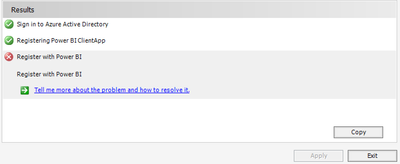
When i attempt to register with powerbi, I the results below.


Is anyone else having the same issue?


Many thanks in advance.


- Sign into Azure Active Directory PASS

- Registering Power BI ClientApp PASS

- Register with Power BI FAIL


Error Message:

System.Management.ManagementException: This method is not implemented in any class
at System.Management.ManagementException.ThrowWithExtendedInfo(ManagementStatus errorCode)
at System.Management.ManagementObject.GetMethodParameters(String methodName, ManagementBaseObject& inParameters, IWbemClassObjectFreeThreaded& inParametersClass, IWbemClassObjectFreeThreaded& outParametersClass)
at System.Management.ManagementObject.GetMethodParameters(String methodName)
at Microsoft.ReportingServices.WmiProvider.RSWmiAdmin.SavePowerBIInformation(String clientId, String clientSecret, String appObjectId, String tenantName, String tenantId, String resourceUrl, String authUrl, String tokenUrl, String redirectUrls)
at ReportServicesConfigUI.WMIProvider.RSReportServerAdmin.SavePowerBIInformation(PowerBIAppConfiguration appConfig)


6 REPLIES 6
MartinHaman
Advocate I
Advocate I

To resolve the issue:
1. Re-download SSRS 2017 RC: https://www.microsoft.com/en-us/download/details.aspx?id=55252
2. Run the installer and choose "Upgrade Reporting Services"
3. Run Report Server Configuration Manager and you should now be able to configure your report server.

4. Enjoy Power BI report server

Thanks

MartinHaman
Advocate I
Advocate I

tringuyenminh92
Memorable Member
Memorable Member

Hi staffs,


I got same issue with @Anonymous,


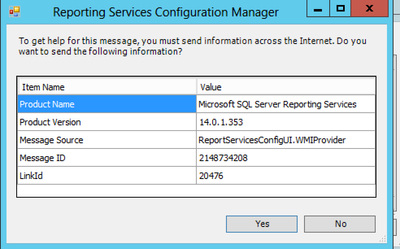
Screenshot 2017-02-13 11.55.07.pngScreenshot 2017-02-13 11.55.53.png


Microsoft.ReportingServices.WmiProvider.WMIProviderException: An unknown error has occurred in the WMI Provider. Error Code 80131500

 ---> System.Exception: Exception of type 'System.Exception' was thrown.
   --- End of inner exception stack trace ---
   at Microsoft.ReportingServices.WmiProvider.RSWmiAdmin.ThrowOnError(ManagementBaseObject mo)
   at Microsoft.ReportingServices.WmiProvider.RSWmiAdmin.SavePowerBIInformation(String clientId, String clientSecret, String appObjectId, String tenantName, String tenantId, String resourceUrl, String authUrl, String tokenUrl, String redirectUrls)
   at ReportServicesConfigUI.WMIProvider.RSReportServerAdmin.SavePowerBIInformation(PowerBIAppConfiguration appConfig)

Hi Did you manage to resolve this? i am having the same issue.

Thanks

Tom

Hi @TMAUND123,


if "User Built-in account" for setting of Reporting service account is not working, please try with second option (use another account). I will check again and let you know.

prabhsingh
New Member

Hi all,


I am getting a similar error when integrating power BI in Reporting Services Configuration Manager.


"Sign in to azure directory"


Cn you help me with this.


Thanks in advance!!

Helpful resources

Announcements
Power BI DataViz World Championships

Power BI Dataviz World Championships

The Power BI Data Visualization World Championships is back! Get ahead of the game and start preparing now!

December 2025 Power BI Update Carousel

Power BI Monthly Update - December 2025

Check out the December 2025 Power BI Holiday Recap!

FabCon Atlanta 2026 carousel

FabCon Atlanta 2026

Join us at FabCon Atlanta, March 16-20, for the ultimate Fabric, Power BI, AI and SQL community-led event. Save $200 with code FABCOMM.