cancel
Showing results for 
Search instead for 
Did you mean: 

The Power BI Data Visualization World Championships is back! It's time to submit your entry. Live now!

Reply
vsn_alt2000
New Member

map-enable

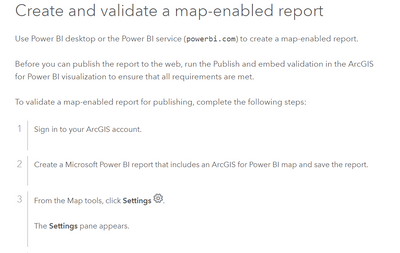
Hi, I have some issues with ArcGIS for Power BI. After following these instructions: https://doc.arcgis.com/en/microsoft-365/latest/power-bi/publish-to-web.htm I do not know where is the option "Settings", it is on Power BI...where is the validation for the map-enable report?

vsn_alt2000_0-1695233661975.png

Thanks

1 REPLY 1
collinq
Super User
Super User

Hi @vsn_alt2000 ,


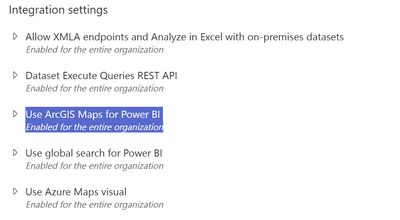
There are potentially a couple places that have to be turned on for maps to work.  First, the Admin Center for Power BI needs to have it enabled:

collinq_0-1695308016113.png


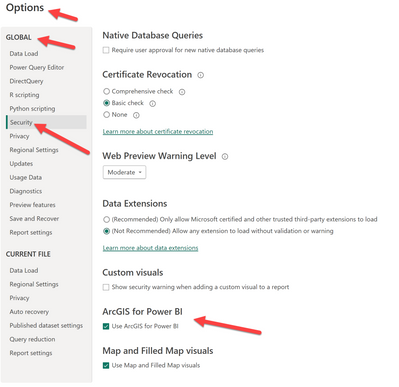
And, have it turned on in the file itself in Power BI Desktop:

collinq_1-1695308099420.png


Then, you should be good to go if I fully understand your question.


Did I answer your question? Mark my post as a solution!

Proud to be a Datanaut!
Private message me for consulting or training needs.


Helpful resources

Announcements
December 2025 Power BI Update Carousel

Power BI Monthly Update - December 2025

Check out the December 2025 Power BI Holiday Recap!

FabCon Atlanta 2026 carousel

FabCon Atlanta 2026

Join us at FabCon Atlanta, March 16-20, for the ultimate Fabric, Power BI, AI and SQL community-led event. Save $200 with code FABCOMM.