cancel
Showing results for 
Search instead for 
Did you mean: 

Vote for your favorite vizzies from the Power BI Dataviz World Championship submissions. Vote now!

Reply
vsn_alt2000
New Member

map-enable

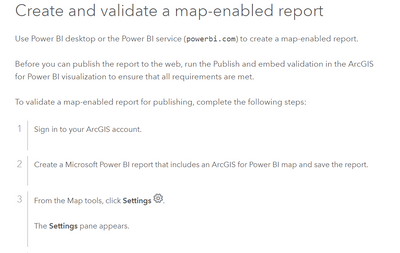
Hi, I have some issues with ArcGIS for Power BI. After following these instructions: https://doc.arcgis.com/en/microsoft-365/latest/power-bi/publish-to-web.htm I do not know where is the option "Settings", it is on Power BI...where is the validation for the map-enable report?

vsn_alt2000_0-1695233661975.png

Thanks

1 REPLY 1
collinq
Super User
Super User

Hi @vsn_alt2000 ,


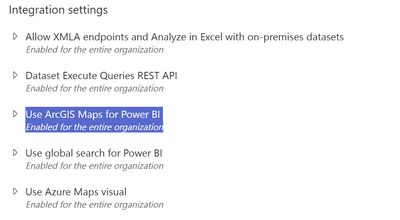
There are potentially a couple places that have to be turned on for maps to work.  First, the Admin Center for Power BI needs to have it enabled:

collinq_0-1695308016113.png


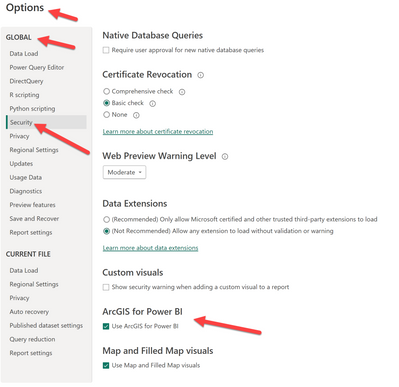
And, have it turned on in the file itself in Power BI Desktop:

collinq_1-1695308099420.png


Then, you should be good to go if I fully understand your question.


Did I answer your question? Mark my post as a solution!

Proud to be a Datanaut!
Private message me for consulting or training needs.


Helpful resources

Announcements
Power BI DataViz World Championships

Power BI Dataviz World Championships

Vote for your favorite vizzies from the Power BI World Championship submissions!

Sticker Challenge 2026 Carousel

Join our Community Sticker Challenge 2026

If you love stickers, then you will definitely want to check out our Community Sticker Challenge!

January Power BI Update Carousel

Power BI Monthly Update - January 2026

Check out the January 2026 Power BI update to learn about new features.

FabCon Atlanta 2026 carousel

FabCon Atlanta 2026

Join us at FabCon Atlanta, March 16-20, for the ultimate Fabric, Power BI, AI and SQL community-led event. Save $200 with code FABCOMM.