This time we’re going bigger than ever. Fabric, Power BI, SQL, AI and more. We're covering it all. You won't want to miss it.
Learn moreJoin the FabCon + SQLCon recap series. Up next: Power BI, Real-Time Intelligence, IQ and AI, and Data Factory take center stage. All sessions are available on-demand after the live show. Register now
Hi
I've created a dashboard and added a file. i've pasted my html into the embed code box and it displays correctly.
what i would like to do is use a html button to link to another dashboard in the app. ive put the url in the href= "xxx" but nothing happened when i click the button.
is it possible to naviagate dashboards in this way ?
Cheers
Solved! Go to Solution.
Hi @nwarwick,
To add a href link in Html code, please refer to example in this blog.
However, based on my test, it is not possible to naviagate a dashboard via adding the dashboard URL in embeded code. Because, as of now, we cannot generate a public URL for dashboard as what we can do for a report via clicking "publish to web". In other words, only dashboard owner and those recipients shared dashboard with can view dashboard content.
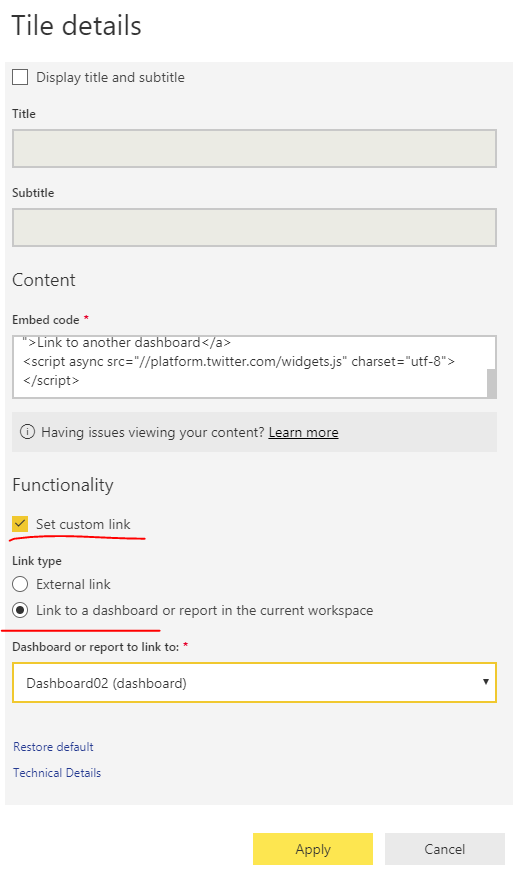
As a workaround, you can add a custom link for the tile which points to a specific dashboard.
Please click the three dots on the top right of tile, set custom link follow below screenshot. To open the custom link, please click the three dots again, choose "Open hyperlink".
Best regards,
Yuliana Gu
Hi @nwarwick,
To add a href link in Html code, please refer to example in this blog.
However, based on my test, it is not possible to naviagate a dashboard via adding the dashboard URL in embeded code. Because, as of now, we cannot generate a public URL for dashboard as what we can do for a report via clicking "publish to web". In other words, only dashboard owner and those recipients shared dashboard with can view dashboard content.
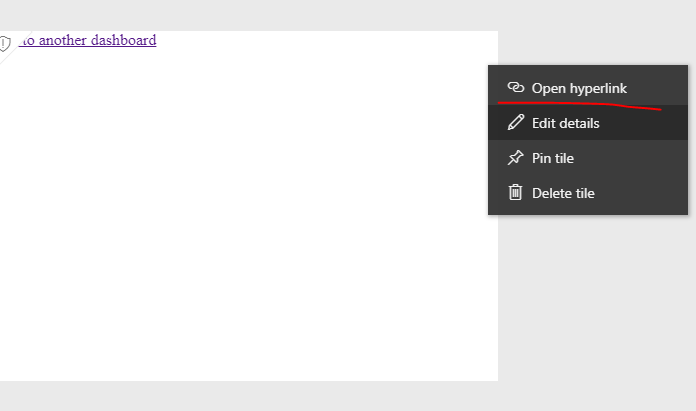
As a workaround, you can add a custom link for the tile which points to a specific dashboard.
Please click the three dots on the top right of tile, set custom link follow below screenshot. To open the custom link, please click the three dots again, choose "Open hyperlink".
Best regards,
Yuliana Gu
Check out the April 2026 Power BI update to learn about new features.
If you have recently started exploring Fabric, we'd love to hear how it's going. Your feedback can help with product improvements.
A new Power BI DataViz World Championship is coming this June! Don't miss out on submitting your entry.
| User | Count |
|---|---|
| 11 | |
| 9 | |
| 8 | |
| 8 | |
| 7 |
| User | Count |
|---|---|
| 49 | |
| 34 | |
| 27 | |
| 21 | |
| 20 |