cancel
Showing results for 
Search instead for 
Did you mean: 

Learn from the best! Meet the four finalists headed to the FINALS of the Power BI Dataviz World Championships! Register now

Reply
pji
Advocate I
Advocate I

filter string not working

The filter string is not working for me. I added the following to my report:


ReportSection?filter=Sheet1/Name eq 'Name1'


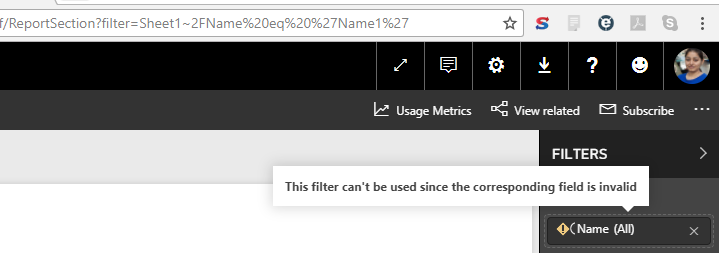
However, when I press Enter, then the Report level filters on right side show "( Name" as the filter field, and then it gives an error saying "This filter can't be used since the corresponding field is invalid".


Screenshot included.


FilterURL.PNG


1 ACCEPTED SOLUTION

No I don't have a "(" before the Name. It's a bug in Power BI.

I got it resolved, turns out if the report is published to web, then it appends a "(" to the field name on its own. So I just created a new report, without publishing to web.

View solution in original post

2 REPLIES 2
Anonymous
Not applicable

@pji Do you have a "(" before the Name field? Is that character just an image glitch or part of the name? 

No I don't have a "(" before the Name. It's a bug in Power BI.

I got it resolved, turns out if the report is published to web, then it appends a "(" to the field name on its own. So I just created a new report, without publishing to web.

Helpful resources

Announcements
Join our Fabric User Panel

Join our Fabric User Panel

Share feedback directly with Fabric product managers, participate in targeted research studies and influence the Fabric roadmap.

February Power BI Update Carousel

Power BI Monthly Update - February 2026

Check out the February 2026 Power BI update to learn about new features.

FabCon Atlanta 2026 carousel

FabCon Atlanta 2026

Join us at FabCon Atlanta, March 16-20, for the ultimate Fabric, Power BI, AI and SQL community-led event. Save $200 with code FABCOMM.