Join us at FabCon Atlanta from March 16 - 20, 2026, for the ultimate Fabric, Power BI, AI and SQL community-led event. Save $200 with code FABCOMM.
Register now!Vote for your favorite vizzies from the Power BI Dataviz World Championship submissions. Vote now!
I have a question on exporting to PDF in power bi online.
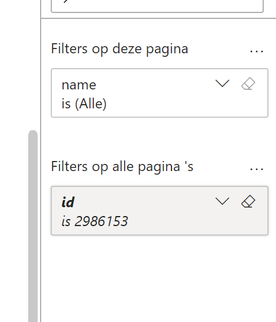
I have a filter on all pages:
When I export to PDF, this filter is not applied. So the downloaded PDF is not applied with id '2986153'
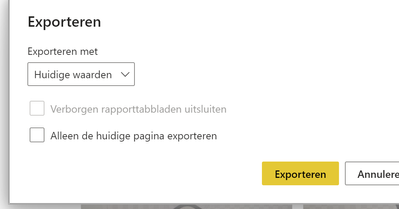
I export with "current values"
'Huidige Waarden' means 'Current Values'
Does anyone know why this filter is not applied?
Solved! Go to Solution.
Hi @Arendp ,
Try use Power BI REST APIs to export report and filter a report using query string parameters in the URL.
In the Power BI service, URL filters aren't currently respected when you choose Current Values for your export.
Refer to:
Microsoft -- PowerBIReportExportConfiguration
https://docs.microsoft.com/en-us/power-bi/collaborate-share/service-url-filters
Best Regards,
Community Support Team _ Caitlyn
Hi @Arendp,
See this article on automating the export of user-specific PDFs (with filters and slicers applied) from Power BI.
https://medium.com/bi-helper/automated-distribution-of-power-bi-reports-and-dashboards-25fde6c68af0
Hi @Arendp ,
Try use Power BI REST APIs to export report and filter a report using query string parameters in the URL.
In the Power BI service, URL filters aren't currently respected when you choose Current Values for your export.
Refer to:
Microsoft -- PowerBIReportExportConfiguration
https://docs.microsoft.com/en-us/power-bi/collaborate-share/service-url-filters
Best Regards,
Community Support Team _ Caitlyn
extra info, the filter is set via an url:
https://app.powerbi.com/groups/f87f73c-80aa66/reports/7d0df3ef--7b5795fa/ReportSection187c8b?filter=Inspections%2Fid%20eq%202986153
Maybe it makes a difference?
The Power BI Data Visualization World Championships is back! It's time to submit your entry.
If you love stickers, then you will definitely want to check out our Community Sticker Challenge!
Check out the January 2026 Power BI update to learn about new features.
| User | Count |
|---|---|
| 23 | |
| 12 | |
| 12 | |
| 10 | |
| 9 |
| User | Count |
|---|---|
| 56 | |
| 37 | |
| 30 | |
| 26 | |
| 23 |