cancel
Showing results for 
Search instead for 
Did you mean: 

Level up your Power BI skills this month - build one visual each week and tell better stories with data! Get started

Reply
fforest
Regular Visitor

data permission

Hello,


A client is considering Power BI to support data exploration scenarios for 50ish users. However the data is quite sensitiveand a technical requirement is that, while users are welcomed to explore the data via the portal, having a local copy of the data on their personal computer (either by exporting a csv, xlsx or pbix) is a big no-no. Also, not every user should have access to the same data sources.


My questions are: 
- I've seen ways to limit a data set on a per-user basis by using RLS... but I didn't see anywhere a way to prevent the usage of a data source altogher for a user (or a group of user). What am I missing?
- I saw an option on an article to prevent the exporting of data which seem to limit the user's ability to download data from a particular viz. But I'm unsure if this will prevent the users from downloading the whole .pbix altogether, with the data within.


Much thanks!

1 ACCEPTED SOLUTION
v-caliao-msft
Microsoft Employee
Microsoft Employee

Hi @fforest,


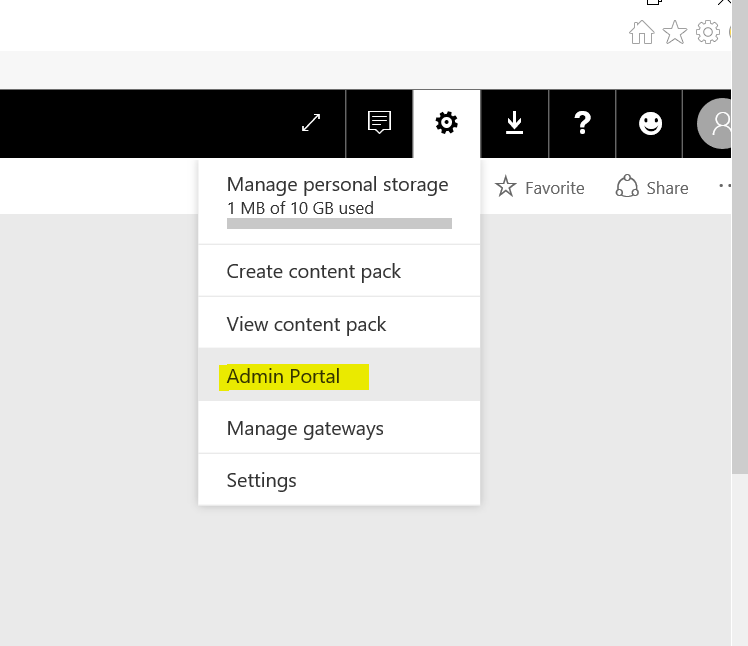
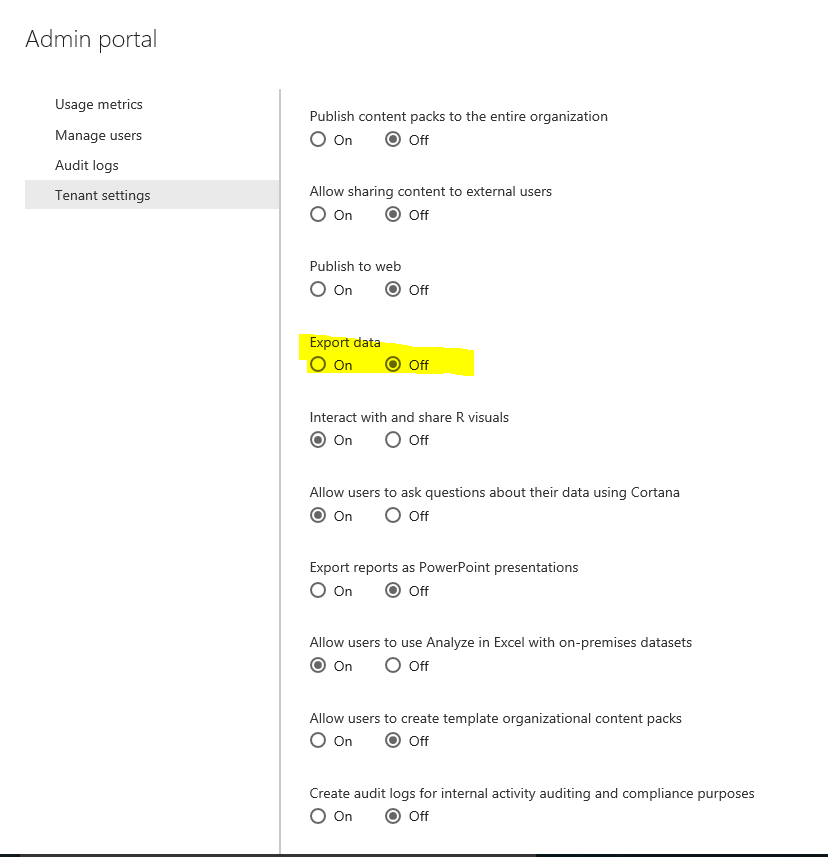
You can add turn off export data in your Power BI site if you have admin permission on your Office 365 group.
Capture1.PNGCapture2.PNG


Then add users in you Office 365 Admin center.

https://portal.office.com/adminportal/home#/users


Then users cannot export data when view report in Power BI site.
Capture.PNG


Regards,

Charlie Liao

View solution in original post

4 REPLIES 4
v-caliao-msft
Microsoft Employee
Microsoft Employee

Hi @fforest,


You can add turn off export data in your Power BI site if you have admin permission on your Office 365 group.
Capture1.PNGCapture2.PNG


Then add users in you Office 365 Admin center.

https://portal.office.com/adminportal/home#/users


Then users cannot export data when view report in Power BI site.
Capture.PNG


Regards,

Charlie Liao

fforest
Regular Visitor

Hello,


A client is considering Power BI to support data exploration scenarios for 50ish users. However the data is quite sensitive and a technical requirement is that, while users are welcomed to explore the data via the portal, having a local copy of the data on their personal computer (either by exporting a csv, xlsx or pbix) is a big no-no. Also, not every user should have access to the same data sources.


My questions are:
- I've seen ways to limit a data set on a per-user basis by using RLS... but I didn't see anywhere a way to prevent the usage of a data source altogher for a user (or a group of user). What am I missing?
- I saw an option on an article to prevent the exporting of data which seem to limit the user's ability to download data from a particular viz. But I'm unsure if this will prevent the users from downloading the whole .pbix altogether, with the data within.


Much thanks!

Greg_Deckler
Community Champion
Community Champion

Using the Enterprise Gateway, you can limit who can use a data source. With RLS, if a user does not fall into one of the groups that has access, they will not see any of the data which effectively prevents its use. You could also use Group Workspaces to control access to data as well.


You cannot currently export a PBIX file from the Service and I expect that when that capability is released, it will have similar administratrive controls as today that prevent exporting data from visuals.


Follow on LinkedIn
@ me in replies or I'll lose your thread!!!
Instead of a Kudo, please vote for this idea
Become an expert!: Enterprise DNA
External Tools: MSHGQM
YouTube Channel!: Microsoft Hates Greg
Latest book!:
DAX For Humans

DAX is easy, CALCULATE makes DAX hard...

Thanks @Greg_Deckler. Since our source is a SQL Azure DB, there wasn't an enterprise gateway to speak of, but group workspace and/or RLS should do the trick.

Thanks @v-caliao-msft too for the detailed info. I didn't admin privileges on the demo I quickly put together so I didn't see that option, but it is indeed what I was looking for.

Helpful resources

Announcements
April Power BI Update Carousel

Power BI Monthly Update - April 2026

Check out the April 2026 Power BI update to learn about new features.

Fabric SQL PBI Data Days

Data Days 2026 coming soon!

Sign up to receive a private message when registration opens and key events begin.

New to Fabric survey Carousel

New to Fabric Survey

If you have recently started exploring Fabric, we'd love to hear how it's going. Your feedback can help with product improvements.

Power BI DataViz World Championships carousel

Power BI DataViz World Championships - June 2026

A new Power BI DataViz World Championship is coming this June! Don't miss out on submitting your entry.