FabCon is coming to Atlanta
Join us at FabCon Atlanta from March 16 - 20, 2026, for the ultimate Fabric, Power BI, AI and SQL community-led event. Save $200 with code FABCOMM.
Register now!- Power BI forums
- Get Help with Power BI
- Desktop
- Service
- Report Server
- Power Query
- Mobile Apps
- Developer
- DAX Commands and Tips
- Custom Visuals Development Discussion
- Health and Life Sciences
- Power BI Spanish forums
- Translated Spanish Desktop
- Training and Consulting
- Instructor Led Training
- Dashboard in a Day for Women, by Women
- Galleries
- Data Stories Gallery
- Themes Gallery
- Contests Gallery
- QuickViz Gallery
- Quick Measures Gallery
- Visual Calculations Gallery
- Notebook Gallery
- Translytical Task Flow Gallery
- TMDL Gallery
- R Script Showcase
- Webinars and Video Gallery
- Ideas
- Custom Visuals Ideas (read-only)
- Issues
- Issues
- Events
- Upcoming Events
Get Fabric Certified for FREE during Fabric Data Days. Don't miss your chance! Request now
- Power BI forums
- Forums
- Get Help with Power BI
- Service
- Re: couldn't load the data for this visual. power ...
- Subscribe to RSS Feed
- Mark Topic as New
- Mark Topic as Read
- Float this Topic for Current User
- Bookmark
- Subscribe
- Printer Friendly Page


- Mark as New
- Bookmark
- Subscribe
- Mute
- Subscribe to RSS Feed
- Permalink
- Report Inappropriate Content
couldn't load the data for this visual. power bi dashboard embedded in power apps
Hello all,
I have embeded dashboard report to power apps (tileURL). it can be accessed succesfully. but when I scroll down to load the data. I have below error. there are choices fields as well in dataverse. I am using dataverse as data source. I do not understand error properly. Can any one please help me how to solve this and understand this error?
Thank you
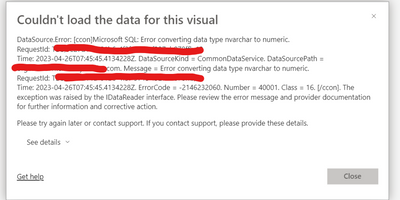
Solved! Go to Solution.
- Mark as New
- Bookmark
- Subscribe
- Mute
- Subscribe to RSS Feed
- Permalink
- Report Inappropriate Content
Hello,
I found the solution. this error was because of calculated columns in my datasource. i converted all to text. it solved the error.


- Mark as New
- Bookmark
- Subscribe
- Mute
- Subscribe to RSS Feed
- Permalink
- Report Inappropriate Content
when I asked "are you joining 2 tables?" you replied "yes".
anyway, so the root cause in somewherelse.
maybe you're trying to convert some columns to int even if they're not convertible.
easiest way to find the problem is to access Dataverse directly with SSMS or Azure Data Studio to look at the data.
maybe in power query you could try to use "Replace Errors" for all the int columns replacing the content to a specific value that you can recognize later in order to find wrong lines.
- Mark as New
- Bookmark
- Subscribe
- Mute
- Subscribe to RSS Feed
- Permalink
- Report Inappropriate Content
Hello,
I found the solution. this error was because of calculated columns in my datasource. i converted all to text. it solved the error.
- Mark as New
- Bookmark
- Subscribe
- Mute
- Subscribe to RSS Feed
- Permalink
- Report Inappropriate Content
Sorry @R1k91 , I have misunderstood. Thank you for you time. I tried to to replace errors with "NA123" it didnot work. How to check errors in SSMS?
- Mark as New
- Bookmark
- Subscribe
- Mute
- Subscribe to RSS Feed
- Permalink
- Report Inappropriate Content
the problem is in dataverse not in power query.
you'll probably have different types.
if your join is like this
TableA.column1= TableB.column1
column1 must be varchar in both tables and it seems they're not in your case.
- Mark as New
- Bookmark
- Subscribe
- Mute
- Subscribe to RSS Feed
- Permalink
- Report Inappropriate Content
I am not joining any tables. I have three tables in dataverse. I am directly shows these three tables in three individual pages in table visual.
- Mark as New
- Bookmark
- Subscribe
- Mute
- Subscribe to RSS Feed
- Permalink
- Report Inappropriate Content
- Mark as New
- Bookmark
- Subscribe
- Mute
- Subscribe to RSS Feed
- Permalink
- Report Inappropriate Content
I checked in Power query
- Mark as New
- Bookmark
- Subscribe
- Mute
- Subscribe to RSS Feed
- Permalink
- Report Inappropriate Content
I expect Power Apps to page data therefore you're seeing the error just because only few rows in your dataset have this problem. when you scroll you retrive new data from the server and you catch rows with errors.
check if you have different data types for the joining columns.
- Mark as New
- Bookmark
- Subscribe
- Mute
- Subscribe to RSS Feed
- Permalink
- Report Inappropriate Content
Hello @R1k91 , I rechecked with the type of all columns, all fields have been assigned with respective types. But among many rows how can I find error?
As I am using directquery (not import) i could not verify all of them in the power query
- Mark as New
- Bookmark
- Subscribe
- Mute
- Subscribe to RSS Feed
- Permalink
- Report Inappropriate Content
yes , the tables are in dataverse with choices columns as well. I could see the data but only few rows are visible. after some records, it shows this error. but when I apply filter it to limited date its shows fine. Is that converstion error because of huge data? the table have around 2lakh rows.
- Mark as New
- Bookmark
- Subscribe
- Mute
- Subscribe to RSS Feed
- Permalink
- Report Inappropriate Content

Helpful resources

Power BI Monthly Update - November 2025
Check out the November 2025 Power BI update to learn about new features.

Fabric Data Days
Advance your Data & AI career with 50 days of live learning, contests, hands-on challenges, study groups & certifications and more!

FabCon Atlanta 2026
Join us at FabCon Atlanta, March 16-20, for the ultimate Fabric, Power BI, AI and SQL community-led event. Save $200 with code FABCOMM.


