This time we’re going bigger than ever. Fabric, Power BI, SQL, AI and more. We're covering it all. You won't want to miss it.
Learn moreLevel up your Power BI skills this month - build one visual each week and tell better stories with data! Get started
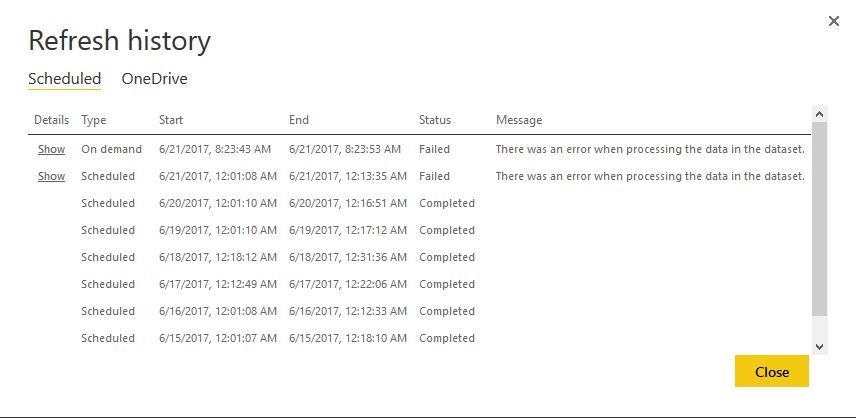
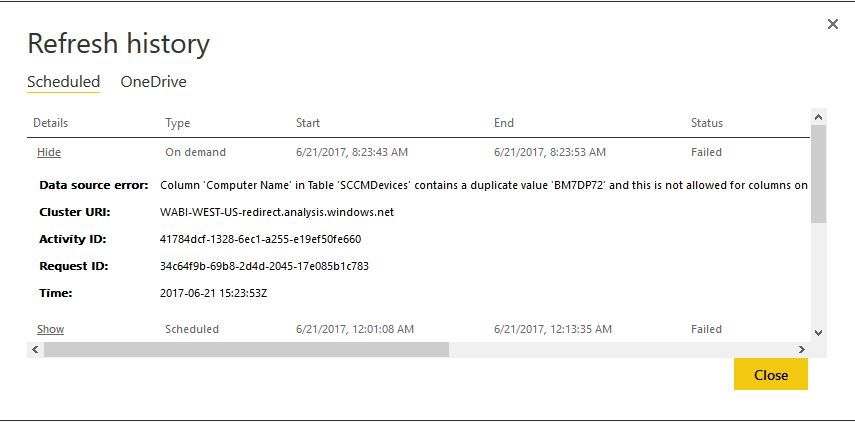
Getting a refresh error. I haven't changed anything on the pbix file. Yet the relations are now having issues. I REALLY need refresh to be stable:
I have a similar Relationship issue upon refreshing, i use a link table with a DAX function that works so as to insure no duplicates. The refresh works fine on desktop but not on Service. I am sourcing the data from a SharePoint folder. Any help greatly appreciated.
I took out the relations and refresh worked. How come this relation failed now but worked before?
@jmiridium,
There is a possibility that the "Computer Name" column doesn't contain duplicate values before, but after you make some changes in the data source(not PBIX file), the "Computer Name" column contains duplicate values breaking the relationship between tables, leading to refresh problem in Power BI Service.
Regards,
Lydia
I just removed the relationship. Didn't effect the report. However, going over the data didn't show a duplicate entry
@jmiridium,
Please make sure that you Remove duplicates in Query Editor of Power BI Desktop as shown in the following screenshot. Then check if you get the error in Power BI Desktop and Power BI Service.
Regards,
Check out the April 2026 Power BI update to learn about new features.
Sign up to receive a private message when registration opens and key events begin.
If you have recently started exploring Fabric, we'd love to hear how it's going. Your feedback can help with product improvements.
| User | Count |
|---|---|
| 11 | |
| 9 | |
| 9 | |
| 7 | |
| 6 |
| User | Count |
|---|---|
| 42 | |
| 27 | |
| 25 | |
| 22 | |
| 22 |