cancel
Showing results for 
Search instead for 
Did you mean: 

Get Fabric Certified for FREE during Fabric Data Days. Don't miss your chance! Request now

Reply
Anonymous
Not applicable

Workspace is public, app is not, can I hide the datasets

Hi all,


We have one big public workspace, avialalbe for hte whole organisatons.

From this workspace, I took several reports and made a management app (only management cna see the app).

Because the app is based on datasets/reports in the public workspace. Everyhoen can see the data. Is there a way how to hide these datasets from them, despite that these are in the public workspace?


Or is the only solution to create a seperate workspace for management, and publish the app from this?

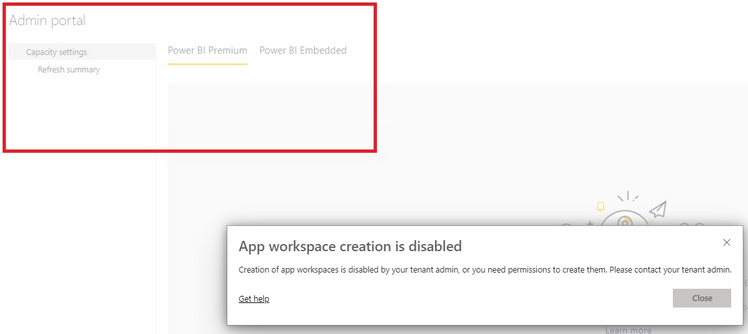
If this is the only solution, it doens't work for me because I get teh following error (despite that I am an admin).

In the admin portal, I can't change anything, as also canbe seen in the screenshot below.


commodity_check_0-1632226853238.png


1 ACCEPTED SOLUTION
Burningsuit
Resident Rockstar
Resident Rockstar

HI @Anonymous 

Having one big public workspace is a poor choice, as you can only build one App from a workspace, and you'll get precicely the problem described where the app access can be limited but the Workspace remains open to all.


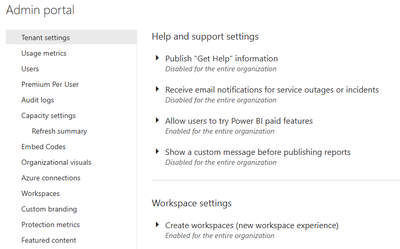
You're right in that you need to build more Workspaces and divide the information up into them. However you don't have Admin rights. Full Admins see this...

Burningsuit_0-1632239691874.png


 You'll need to get your Admin to enable "Create Workspaces" for you, or give you Admin rights so you can grant them yourself.


Hope this helps

Stuart

View solution in original post

1 REPLY 1
Burningsuit
Resident Rockstar
Resident Rockstar

HI @Anonymous 

Having one big public workspace is a poor choice, as you can only build one App from a workspace, and you'll get precicely the problem described where the app access can be limited but the Workspace remains open to all.


You're right in that you need to build more Workspaces and divide the information up into them. However you don't have Admin rights. Full Admins see this...

Burningsuit_0-1632239691874.png


 You'll need to get your Admin to enable "Create Workspaces" for you, or give you Admin rights so you can grant them yourself.


Hope this helps

Stuart

Helpful resources

Announcements
November Power BI Update Carousel

Power BI Monthly Update - November 2025

Check out the November 2025 Power BI update to learn about new features.

Fabric Data Days Carousel

Fabric Data Days

Advance your Data & AI career with 50 days of live learning, contests, hands-on challenges, study groups & certifications and more!

FabCon Atlanta 2026 carousel

FabCon Atlanta 2026

Join us at FabCon Atlanta, March 16-20, for the ultimate Fabric, Power BI, AI and SQL community-led event. Save $200 with code FABCOMM.

Top Solution Authors
Top Kudoed Authors