cancel
Showing results for 
Search instead for 
Did you mean: 

The Power BI Data Visualization World Championships is back! Get ahead of the game and start preparing now! Learn more

Reply
Anonymous
Not applicable

Workspace disappeared

Hi all,


Over the weekend one of our (key) workspaces has suddenly disappeared. We have not been very strict in the past of how they have been created so I can't answer any of that.. What I see is:

- On Thursday the workspace was present. Yesterday all of a sudden the workspace has disappeared

- Yesterday when we noticed it we could see the workspace name present under "Workspaces" in the Admin Portal as type "Group". In the details here we could see the reports and datasets. This is not present today at all

- IT cannot find the group in our AD (both Azure and local AD) which we use for Power BI service

- When I try to access the workspace using the workspace ID I get a "Sorry, you don't have access to that group"-error


Please help! Needless to say we do not have a stict backup-setup so some things are backed up but most things are not.


Kind regards,
Mikkel

1 ACCEPTED SOLUTION
GilbertQ
Super User
Super User

Hi @Anonymous 


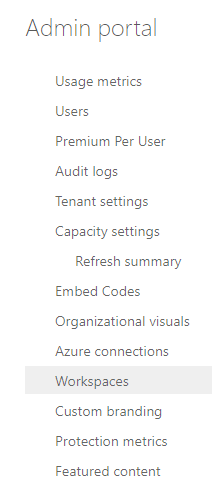
You can go into the Admin Portal and then click on Workspaces

GilbertQ_0-1620164866898.png


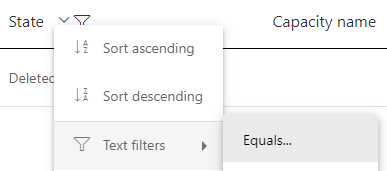
Then change the State for Filter = DELETED


GilbertQ_1-1620164898343.png


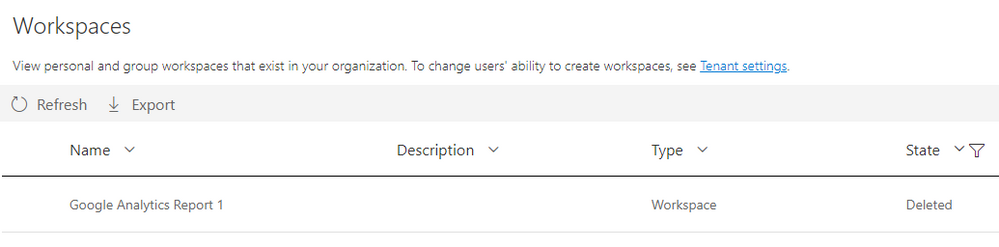
And then you should see the deleted App Workspace

GilbertQ_2-1620164939421.png

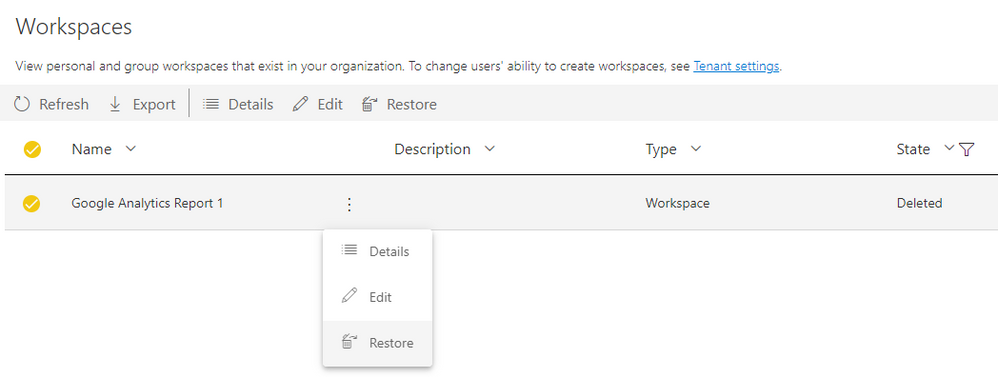
And then you can recover it by clicking on the three buttons and click on Restore

GilbertQ_3-1620165191181.png


Did I answer your question? Mark my post as a solution!

Proud to be a Super User!


Power BI Blog

View solution in original post

4 REPLIES 4
audslloyd43
Frequent Visitor

Hi - we have a situation where a workspace has disappeared and I can't even find it in the Admin portal as deleted. Any ideas appreciated on other steps to recovering it.

GilbertQ
Super User
Super User

Hi @Anonymous 


You can go into the Admin Portal and then click on Workspaces

GilbertQ_0-1620164866898.png


Then change the State for Filter = DELETED


GilbertQ_1-1620164898343.png


And then you should see the deleted App Workspace

GilbertQ_2-1620164939421.png

And then you can recover it by clicking on the three buttons and click on Restore

GilbertQ_3-1620165191181.png


Did I answer your question? Mark my post as a solution!

Proud to be a Super User!


Power BI Blog

Hi @GilbertQ ,


It has happened to me recently bit I haven't done any changes on my reports. The solution you sent works but do you know why does it happen? 


Thanks!


Cris

Hi @CrisRdB 


It could only happen when someone else creates an App Workspace and does not add you in!


Did I answer your question? Mark my post as a solution!

Proud to be a Super User!


Power BI Blog

Helpful resources

Announcements
Power BI DataViz World Championships

Power BI Dataviz World Championships

The Power BI Data Visualization World Championships is back! Get ahead of the game and start preparing now!

December 2025 Power BI Update Carousel

Power BI Monthly Update - December 2025

Check out the December 2025 Power BI Holiday Recap!

FabCon Atlanta 2026 carousel

FabCon Atlanta 2026

Join us at FabCon Atlanta, March 16-20, for the ultimate Fabric, Power BI, AI and SQL community-led event. Save $200 with code FABCOMM.