Get certified for free when you join Fabric Data Days 2026 and dive into Fabric, Power BI, SQL, AI, and other essential data skills.
Join nowTry your skills in the Power BI Dataviz World Championship! Round one ends June 26. Join now
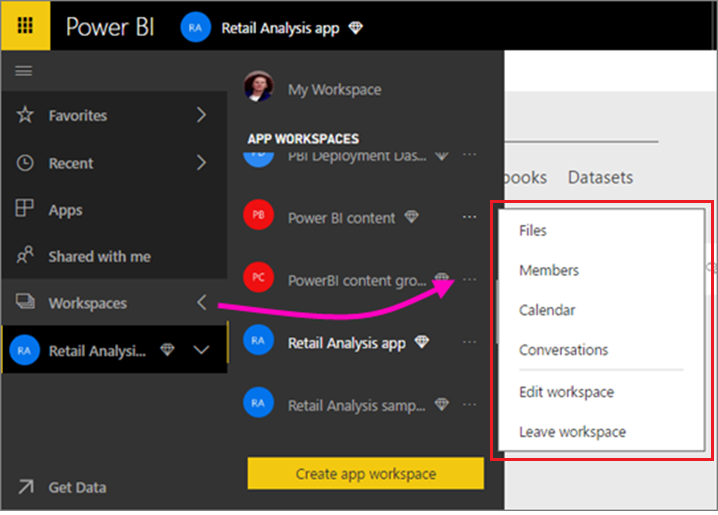
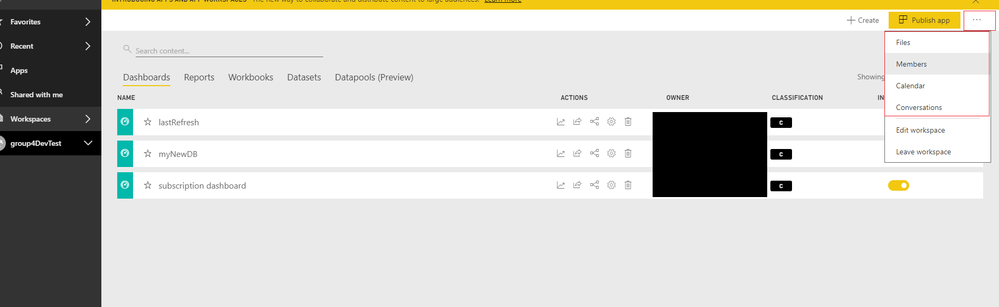
I have a problem to access the options "members" and some others of the workspace of the projects (see images).
Does it have to do with permissions problems?
My Options (Image)
Even iam also facing same problem.
Can you please let me why those options are not coming.
Regards,
Bajee.
When you click "Edit Workspace" do you see the members of the workspace in there? The members option will normally take you out into Outlook and show you the members of the Office 365 group. I'm wondering if you have a workspace that doesn't have an Office 365 group linked to it.
Hi @MiguelSaldana77,
You can also enter to app workspace home page and check its option. If you can't find below menu, it means you not have enough permission.
BTW, if you click on option which you mentioned, it will bring your to office tenant with specific group page.
Regards,
Xiaoxin Sheng
Don't miss out on Data Days, June 15 through August 7. Learn Fabric, Power BI, SQL, AI and more.
Check out the May 2026 Power BI update to learn about new features.
| User | Count |
|---|---|
| 16 | |
| 11 | |
| 11 | |
| 8 | |
| 7 |
| User | Count |
|---|---|
| 41 | |
| 37 | |
| 35 | |
| 35 | |
| 20 |