Get certified for free when you join Fabric Data Days 2026 and dive into Fabric, Power BI, SQL, AI, and other essential data skills.
Join nowJuly 7 - July 17 | Round 2 of the Power BI Dataviz World Championships. Don't miss your chance! Learn more
I would like to know who triggered DataSet refresh!
On the website (PowerBI Service), i can only see when and status of the triggeres, and in the API the 'requestid'.
Is there a way to know who triggered it (User ID, Name, Service Id etc.)
Solved! Go to Solution.
Hi @Anonymous,
The Audit Logs will tell you this information, when looking at the 'RefreshDataset' activity type. It returns the UPN of the user, dataset, timestamp, and a bunch more.
You can set up automated extract through the O365 Security & Compliance Center (90 days of history is kept by default), or through the Power BI Activity Log (30 days of history is kept), and save that data somewhere in a log db, or file archive. Build yourself a report on top of that, because there's an absolute treasure of useful info in there!
More info at MSFT Docs
Hi @Anonymous ,
If you are the global admin or assigned the Audit Logs or View-Only Audit Logs role in Exchange Online, you can use audit logs to see your request details by visiting this website.
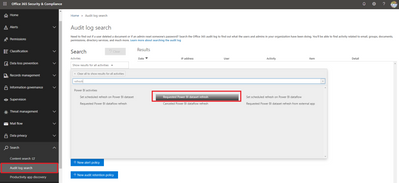
Find Audit log search in Search menu, set the search condition as 'Requested Power BI dataset refresh', you will see the Date, IP, User, Item..when someone requested dataset refresh.
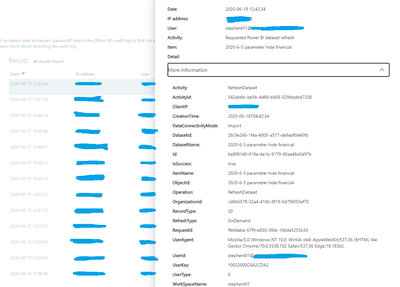
Select one of them, expand more information, you will see more details about this request like refresh tyoe, dataset id, name, connection type, report id, report name, workspace name...
You can also filter the search result and export result according to your needs.
Best Regards,
Yingjie Li
If this post helps then please consider Accept it as the solution to help the other members find it more quickly.
Hi @Anonymous ,
If you are the global admin or assigned the Audit Logs or View-Only Audit Logs role in Exchange Online, you can use audit logs to see your request details by visiting this website.
Find Audit log search in Search menu, set the search condition as 'Requested Power BI dataset refresh', you will see the Date, IP, User, Item..when someone requested dataset refresh.
Select one of them, expand more information, you will see more details about this request like refresh tyoe, dataset id, name, connection type, report id, report name, workspace name...
You can also filter the search result and export result according to your needs.
Best Regards,
Yingjie Li
If this post helps then please consider Accept it as the solution to help the other members find it more quickly.
Hi @Anonymous,
The Audit Logs will tell you this information, when looking at the 'RefreshDataset' activity type. It returns the UPN of the user, dataset, timestamp, and a bunch more.
You can set up automated extract through the O365 Security & Compliance Center (90 days of history is kept by default), or through the Power BI Activity Log (30 days of history is kept), and save that data somewhere in a log db, or file archive. Build yourself a report on top of that, because there's an absolute treasure of useful info in there!
More info at MSFT Docs
Hi @Anonymous ,
I'm not sure, we have that feature in Power BI as of now to track who triggered the refresh. You can post this in https://ideas.powerbi.com/forums/265200-power-bi-ideas
Best Regards,
- Pavan M.
Join us in Barcelona for FabCon and SQLCon, the Fabric, Power BI, SQL, and AI community event. Save €200 with code FABCMTY200.
Join Data Days 2026: 60 days of free live/on-demand sessions, challenges, study groups, and certification opportunities.
| User | Count |
|---|---|
| 25 | |
| 10 | |
| 10 | |
| 6 | |
| 5 |