FabCon is coming to Atlanta
Join us at FabCon Atlanta from March 16 - 20, 2026, for the ultimate Fabric, Power BI, AI and SQL community-led event. Save $200 with code FABCOMM.
Register now!- Power BI forums
- Get Help with Power BI
- Desktop
- Service
- Report Server
- Power Query
- Mobile Apps
- Developer
- DAX Commands and Tips
- Custom Visuals Development Discussion
- Health and Life Sciences
- Power BI Spanish forums
- Translated Spanish Desktop
- Training and Consulting
- Instructor Led Training
- Dashboard in a Day for Women, by Women
- Galleries
- Data Stories Gallery
- Themes Gallery
- Contests Gallery
- QuickViz Gallery
- Quick Measures Gallery
- Visual Calculations Gallery
- Notebook Gallery
- Translytical Task Flow Gallery
- TMDL Gallery
- R Script Showcase
- Webinars and Video Gallery
- Ideas
- Custom Visuals Ideas (read-only)
- Issues
- Issues
- Events
- Upcoming Events
The Power BI Data Visualization World Championships is back! Get ahead of the game and start preparing now! Learn more
- Power BI forums
- Forums
- Get Help with Power BI
- Service
- Re: Where is data stored?
- Subscribe to RSS Feed
- Mark Topic as New
- Mark Topic as Read
- Float this Topic for Current User
- Bookmark
- Subscribe
- Printer Friendly Page

- Mark as New
- Bookmark
- Subscribe
- Mute
- Subscribe to RSS Feed
- Permalink
- Report Inappropriate Content
Where is data stored?
Hi Team,
Please tell me where the powerBI service's dashboard data is stored
When creating with powerBIDisktop and linking to BI service where region will data and model be saved?
I understand that saved in blobstrage and sqldatabase by documentation.
The location of the company is Japan.
Is it the East Japan or West Japan region of Azure, can the storage location be arbitrarily specified by the user?
Solved! Go to Solution.

- Mark as New
- Bookmark
- Subscribe
- Mute
- Subscribe to RSS Feed
- Permalink
- Report Inappropriate Content
Hi @surfin_go
In the Power BI Service you can get this info by clicking "?".

and then "Info"
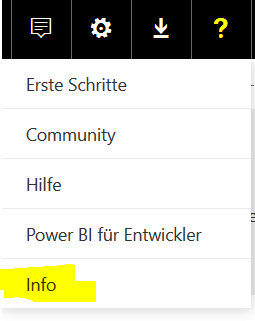
And you get the desired information


- Mark as New
- Bookmark
- Subscribe
- Mute
- Subscribe to RSS Feed
- Permalink
- Report Inappropriate Content
Hi @surfin_go,
Warning:
This selection cannot be changed!
The data region is based on the country that was selected when the tenant was first created. This applies to sign up for Office 365 in addition to Power BI as this information is shared. If this is a new tenant, when you sign up, you will see a country drop down. And according to this article, this selection for data region cannot be changed! 
Regards
- Mark as New
- Bookmark
- Subscribe
- Mute
- Subscribe to RSS Feed
- Permalink
- Report Inappropriate Content
Hi @surfin_go,
You can click 
Regards

- Mark as New
- Bookmark
- Subscribe
- Mute
- Subscribe to RSS Feed
- Permalink
- Report Inappropriate Content
Hi
What is the different about data store in power BI desktop and power BI web service?
Ways to extract data | Data | Visual cache( report) | Credential |
1.live/direct query | ?? | ?? | ?? |
2.Import data | ?? | ?? | ?? |
3.Stream data | ?? | ?? | ?? |
Thank you
Jane
- Mark as New
- Bookmark
- Subscribe
- Mute
- Subscribe to RSS Feed
- Permalink
- Report Inappropriate Content
Hi @surfin_go
In the Power BI Service you can get this info by clicking "?".
and then "Info"
And you get the desired information
- Mark as New
- Bookmark
- Subscribe
- Mute
- Subscribe to RSS Feed
- Permalink
- Report Inappropriate Content
Hi @Anonymous
Thank you for the reply.
I could confirm it. Thank you.
Can the user change the region?
- Mark as New
- Bookmark
- Subscribe
- Mute
- Subscribe to RSS Feed
- Permalink
- Report Inappropriate Content
Hi @surfin_go,
Warning:
This selection cannot be changed!
The data region is based on the country that was selected when the tenant was first created. This applies to sign up for Office 365 in addition to Power BI as this information is shared. If this is a new tenant, when you sign up, you will see a country drop down. And according to this article, this selection for data region cannot be changed!
Regards
- Mark as New
- Bookmark
- Subscribe
- Mute
- Subscribe to RSS Feed
- Permalink
- Report Inappropriate Content
Hi v-ljerr-msft,
Thank you for investigation.
- Mark as New
- Bookmark
- Subscribe
- Mute
- Subscribe to RSS Feed
- Permalink
- Report Inappropriate Content
Hi @surfin_go,
My pleasure!
By the way, could you accept helpful replies as solution to help others who may also have similar issue easily find the answer and close this thread?
Regards
- Mark as New
- Bookmark
- Subscribe
- Mute
- Subscribe to RSS Feed
- Permalink
- Report Inappropriate Content
- Mark as New
- Bookmark
- Subscribe
- Mute
- Subscribe to RSS Feed
- Permalink
- Report Inappropriate Content
Hi @surfin_go,
You can click
Regards
Helpful resources

Power BI Dataviz World Championships
The Power BI Data Visualization World Championships is back! Get ahead of the game and start preparing now!

Power BI Monthly Update - December 2025
Check out the December 2025 Power BI Holiday Recap!

FabCon Atlanta 2026
Join us at FabCon Atlanta, March 16-20, for the ultimate Fabric, Power BI, AI and SQL community-led event. Save $200 with code FABCOMM.


