cancel
Showing results for 
Search instead for 
Did you mean: 

July 7 - July 17 | Round 2 of the Power BI Dataviz World Championships. Don't miss your chance! Learn more

Reply
matout
Helper I
Helper I

Web dataset refresh

Hello,


I am a dashboard connected to a PowerBI report.

this report is getting data from two sources

- Excel sheet on onedrive 

- Yahoo finance (websource) for a single stock.


My problem is that in PowerBI desktop, the refresh data works fine for the stock prices.

However, when publishing it to the PowerBI service (PowerBI Pro), I am being hit by this message


Last refresh failed: Tue Feb 23 2021 14:49:11 GMT+0200 (Eastern European Standard Time)
Scheduled refresh has been disabled.Hide details

Data source error:Scheduled refresh is disabled because at least one data source is missing credentials. To start the refresh again, go to this dataset's settings page and enter credentials for all data sources. Then reactivate scheduled refresh.
Cluster URI:WABI-WEST-EUROPE-redirect.analysis.windows.net
Activity ID:3e7fe7a8-54a8-4af2-be90-715939e450f2
Request ID:cdddee8f-3b07-3bf2-046a-974cf3bfd967
Time:2021-02-23 12:49:11Z


and there is no place to set up cardintials (non of my data sources requires cardintials), and the auto refresh is disabled,


help please, I am stuck

5 REPLIES 5
Anand24
Super User
Super User

Hi @matout ,

It is quite clear from the error message that the credentials for data source are missing. You can simply set it from the dataset settings page of your workspace.

Follow these steps:

1. In the workspace, Go to Datasets + Dataflows

2. for the dataset you want to set credentials, click on the 3 dots and then click on Settings

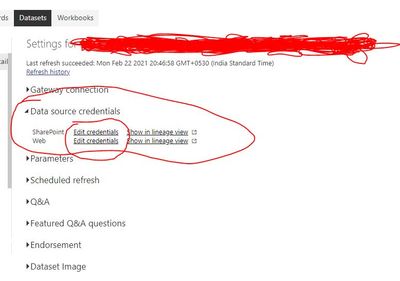
3. Click on Data source Credentials (2nd Option)

4. Click on edit credentials and set the credentials


Image Reference:

datasetcreds.JPG


PBI_SuperUser_Rank@1x.png  

Give a Thumbs Up if this post helped you in any way and Mark This Post as Solution if it solved your query !!!

Proud To Be a Super User !!!
LinkedIn

Hello Anand24


Thank you for your reply

This option is disabled 


matout_0-1614087307502.png

Also my data sources does not need any cardintional (Excel sheet from one drive, and a page from yahoo finance


This page

MSFT 234.51 -6.46 -2.68% : Microsoft Corporation - Yahoo Finance

@matout ,

You are the datset owner for that particular dataset right? Not sure why is it greyed out if you are owner.

The best way ahead would be connecting with MS Support. Link


Also, try publishing to a different workspace and see.

PBI_SuperUser_Rank@1x.png  

Give a Thumbs Up if this post helped you in any way and Mark This Post as Solution if it solved your query !!!

Proud To Be a Super User !!!
LinkedIn

Hello,

I am the owner of this data set, the excel sheet is on my one drive, and a portion of it coming from yahoo finance


I shall contact support.


@matout , Let everyone know in comment how the issue gets resolved so that people can refer this thread in future !!!

PBI_SuperUser_Rank@1x.png  

Give a Thumbs Up if this post helped you in any way and Mark This Post as Solution if it solved your query !!!

Proud To Be a Super User !!!
LinkedIn

Helpful resources

Announcements
FabCon and SQLCon Barcelona 2026

FabCon & SQLCon – Barcelona 2026

Join us in Barcelona for FabCon and SQLCon, the Fabric, Power BI, SQL, and AI community event. Save €200 with code FABCMTY200.

60 days of Data Days Carousel

Data Days 2026

Join Fabric Data Days 2026: 60 days of free live/on-demand sessions, challenges, study groups, and certification opportunities.

Power BI DataViz World Championships carousel

Power BI DataViz World Championships - June 2026

A new Power BI DataViz World Championship is coming this June! Don't miss out on submitting your entry.