cancel
Showing results for 
Search instead for 
Did you mean: 

The Power BI Data Visualization World Championships is back! Get ahead of the game and start preparing now! Learn more

Reply
fabiomanniti
Helper III
Helper III

Visual to show data change in time

Hello, I would like to know if there is a visual I can use to measure the variation of a certain quantity month by month possibly splitted by category.

Example

I have a table 

IDSubscription dateCountry


I would like to see, in the last six months some thing like


 December 2021November 2021October 2021September 2021Agoust 2021June 2021
US381 (-11%)

428 (+7%)

400 (+12%).........
FR123 (+17%)105 (-3%)108 (-9%).........
IT762 (-6%)810 (+15%)705 (+24%).........


It shouldn't be necessarily a matrix of course

1 ACCEPTED SOLUTION

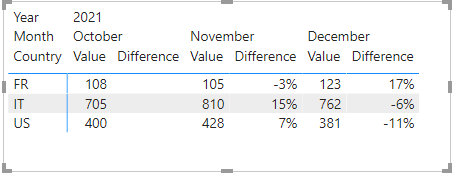
Hi, @fabiomanniti 


If you don't process the data in advance on the desktop, you won't get your desired results directly through the visuals.


Maybe you can try the following methods.

Column:

last date = DATEADD('Table'[Subscription date],-1,MONTH)

Measure:

Difference =
VAR N1 =CALCULATE (
        SUM ( 'Table'[Value] ),
        FILTER ( ALL ( 'Table' ),
            [Country] = MAX ( 'Table'[Country] )
                && [ID] = MAX ( 'Table'[ID] ) ) )
VAR N2 =CALCULATE (
        SUM ( 'Table'[Value] ),
        FILTER (  ALL ( 'Table' ),
            [Country] = MAX ( 'Table'[Country] )
                && [Subscription date] = MAX ( 'Table'[last date] ) ) )
RETURN DIVIDE ( N1 - N2, N2 )

vzhangti_0-1642648304044.png


Best Regards,

Community Support Team _Charlotte

If this post helps, then please consider Accept it as the solution to help the other members find it more quickly.

View solution in original post

4 REPLIES 4
AlexisOlson
Super User
Super User

Yes, these tools per se look good but, for I understood, I must already have data worked on Desktop...

I mean: if I only have this table

IDSubscription dateCountry
101/01/2019IT
202/01/2019FR
303/01/2019US


Can I know ONLY with a visual the id counting for each Country and each month (for only the last n months) and see the changing ratio compared to the previous month?


If I can do it with those visual then I think I didn't understand how

Hi, @fabiomanniti 


If you don't process the data in advance on the desktop, you won't get your desired results directly through the visuals.


Maybe you can try the following methods.

Column:

last date = DATEADD('Table'[Subscription date],-1,MONTH)

Measure:

Difference =
VAR N1 =CALCULATE (
        SUM ( 'Table'[Value] ),
        FILTER ( ALL ( 'Table' ),
            [Country] = MAX ( 'Table'[Country] )
                && [ID] = MAX ( 'Table'[ID] ) ) )
VAR N2 =CALCULATE (
        SUM ( 'Table'[Value] ),
        FILTER (  ALL ( 'Table' ),
            [Country] = MAX ( 'Table'[Country] )
                && [Subscription date] = MAX ( 'Table'[last date] ) ) )
RETURN DIVIDE ( N1 - N2, N2 )

vzhangti_0-1642648304044.png


Best Regards,

Community Support Team _Charlotte

If this post helps, then please consider Accept it as the solution to help the other members find it more quickly.

I don't know if there's anything that will work without writing a measure or two. The visual doesn't automatically know what values and granularities you want to compare.

Helpful resources

Announcements
November Power BI Update Carousel

Power BI Monthly Update - November 2025

Check out the November 2025 Power BI update to learn about new features.

Fabric Data Days Carousel

Fabric Data Days

Advance your Data & AI career with 50 days of live learning, contests, hands-on challenges, study groups & certifications and more!

FabCon Atlanta 2026 carousel

FabCon Atlanta 2026

Join us at FabCon Atlanta, March 16-20, for the ultimate Fabric, Power BI, AI and SQL community-led event. Save $200 with code FABCOMM.

Top Solution Authors