Join us at FabCon Atlanta from March 16 - 20, 2026, for the ultimate Fabric, Power BI, AI and SQL community-led event. Save $200 with code FABCOMM.
Register now!Learn from the best! Meet the four finalists headed to the FINALS of the Power BI Dataviz World Championships! Register now
Hello,
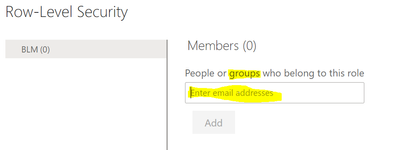
I am trying to implement RLS in Power BI.
On the Desktop, I have created Roles and Assigned Rules to them.
In the Service, I can add users one by one. But I need to add hundreds of users via a group.
Can anyone please provide step by step instructions on how to create groups of users that I can enter so I don't have to enter users individually?
Many Thanks!!
Pavan
Solved! Go to Solution.
Hi @Anonymous
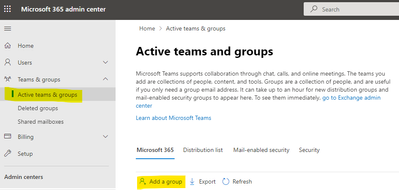
You can create a group in Microsoft 365 admin center with global admin or user admin . Then you can add user in the group you created before .
Microsoft's official documentation details how to create groups and how to add users to groups, you can refer to it .
https://docs.microsoft.com/en-us/microsoft-365/admin/create-groups/create-groups?view=o365-worldwide
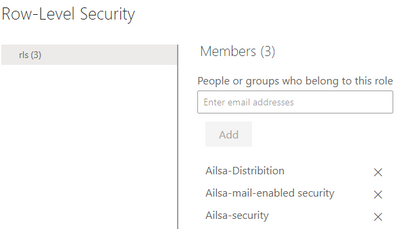
Then you can search and add the group in RLS .
Best Regard
Community Support Team _ Ailsa Tao
If this post helps, then please consider Accept it as the solution to help the other members find it more quickly.
Hi @Anonymous
You can create a group in Microsoft 365 admin center with global admin or user admin . Then you can add user in the group you created before .
Microsoft's official documentation details how to create groups and how to add users to groups, you can refer to it .
https://docs.microsoft.com/en-us/microsoft-365/admin/create-groups/create-groups?view=o365-worldwide
Then you can search and add the group in RLS .
Best Regard
Community Support Team _ Ailsa Tao
If this post helps, then please consider Accept it as the solution to help the other members find it more quickly.
Hi Collin,
Many Thanks! I do like Guy In A Cube videos.
I this video, it shows how to use the Groups he alread created.
I am looking for step by step guidance on how to create the groups.
Regards,
Pavan
Hi @Anonymous ,
This is laid out pretty well by @GilbertQ in the post below. The answer to your specific question about exactly HOW to do it depends a bit on the group you pick. For example, if you are using Security Group, that is created in ADD or O365.
Proud to be a Datanaut!
Private message me for consulting or training needs.
Hi @Anonymous ,
This link should help show you want you are asking:
Can you use GROUPS with Power BI Row-Level Security (RLS)??? - Guy in a Cube
Proud to be a Datanaut!
Private message me for consulting or training needs.
Share feedback directly with Fabric product managers, participate in targeted research studies and influence the Fabric roadmap.
Check out the February 2026 Power BI update to learn about new features.
| User | Count |
|---|---|
| 46 | |
| 41 | |
| 41 | |
| 25 | |
| 23 |