This is best Fabric, Power BI, SQL and AI community event. How do we know? The last event sold out! Save €200 with code FABCMTY200.
Register nowA new Data Days event is coming soon! This time we’re going bigger than ever. Fabric, Power BI, SQL, AI and more. Don't miss out.
Hi,
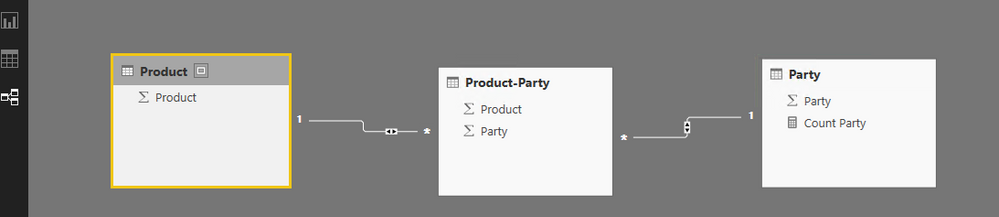
I've following model defined in my Power BI Desktop
PRODUCT -------------> PARTY_PRODUCT <--------------- PARTY
1 to Many (Single) 1 to Many (Single)
If I make a report adding 'prouct name' from PRODUCT and COUNT(PARTY_ID) from 'PARTY', it makes a cross join and shows following date
PRODUCT_NAME COUNT(PARTY_ID)
A 100
B 100
C 100
D 100
E 100
F 100
To identify the issue, i need to see what query does POWER BI SERVICE make. how can i view the final query?
I looked into DB (Azure Warehouse) query (using select * from sys.dm_pdw_exec_requests) which makes two seperate query and then stitches them in POWER BI.
Is it possible to see final query made by SERVICE in POWER BI?
Thanks.
Solved! Go to Solution.
No. It's still not supported to see the query generated by Power BI. You may submit a feature request on idea.
Regards,
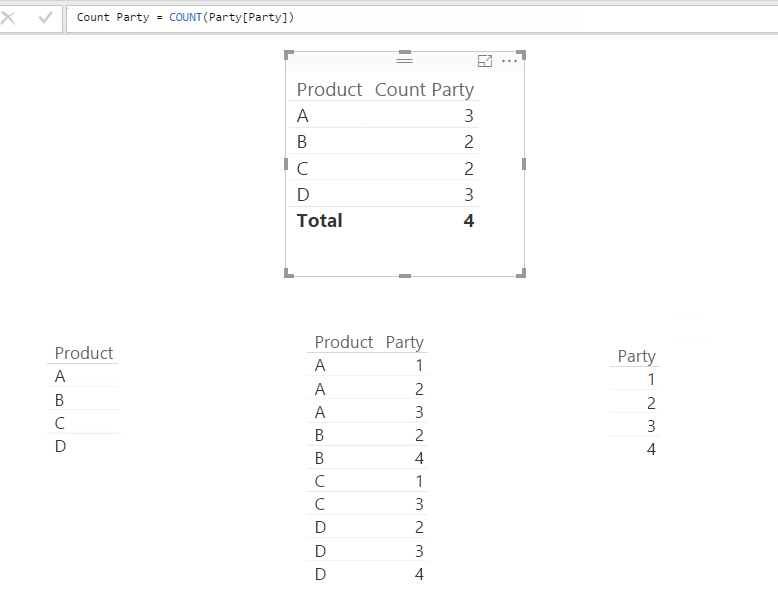
I haven't encountered your issue. Please verify your relationship built. See my sample with a similar many-to-many scenario as yours:
Regards,
Simon Hou
@v-sihou-msft, yeah I got it. I changed my cross filteration to both and it worked perfectly.
But is there any way I can look at the query that Power BI made? just like 'Query View' in Microstrategy?
Thanks.
No. It's still not supported to see the query generated by Power BI. You may submit a feature request on idea.
Regards,
Check out the May 2026 Power BI update to learn about new features.
Sign up to receive a private message when registration opens and key events begin.
If you have recently started exploring Fabric, we'd love to hear how it's going. Your feedback can help with product improvements.
| User | Count |
|---|---|
| 14 | |
| 9 | |
| 9 | |
| 7 | |
| 7 |
| User | Count |
|---|---|
| 36 | |
| 28 | |
| 26 | |
| 20 | |
| 18 |