This time we’re going bigger than ever. Fabric, Power BI, SQL, AI and more. We're covering it all. You won't want to miss it.
Learn moreDid you hear? There's a new SQL AI Developer certification (DP-800). Start preparing now and be one of the first to get certified. Register now
Hello everyone,
I am trying to set up the XMLA endpoint for an embedded capacity but am running into issues. I have a workspace assigned, the XMLA is set to Read, but when i try to connect using DAX studio or tabulaur it just return 400 bad request. I am the admin of both the capacity and the workspace. What am i missing here?
Solved! Go to Solution.
Hi,
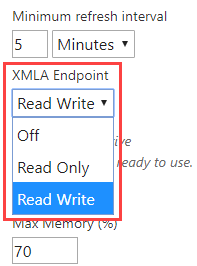
As far as I’m concerned, if you want to connect to your Power BI dataset using external tools through the XMLA endpoint, you should first make sure that your user account has a PPU license unless the dataset resides on a Premium capacity. Then you also need to turn on the XMLA read-write because you are using the applications that perform write operations like DAX studio/ Tabular editor.
You can go to the Admin portal, select Capacity settings > Power BI Premium > capacity name > Workload:
For more info, you can refer to this link:
https://docs.microsoft.com/en-us/power-bi/admin/service-premium-connect-tools
Thank you very much!
Best Regards,
Community Support Team _Robert Qin
If this post helps, then please consider Accept it as the solution to help the other members find it more quickly.
Hi,
As far as I’m concerned, if you want to connect to your Power BI dataset using external tools through the XMLA endpoint, you should first make sure that your user account has a PPU license unless the dataset resides on a Premium capacity. Then you also need to turn on the XMLA read-write because you are using the applications that perform write operations like DAX studio/ Tabular editor.
You can go to the Admin portal, select Capacity settings > Power BI Premium > capacity name > Workload:
For more info, you can refer to this link:
https://docs.microsoft.com/en-us/power-bi/admin/service-premium-connect-tools
Thank you very much!
Best Regards,
Community Support Team _Robert Qin
If this post helps, then please consider Accept it as the solution to help the other members find it more quickly.
hi @v-robertq-msft , in reading this documentation is it true that xmla endpoint can't be used with embedded?
I set myself up as PPU but I can't write to an embeddded workspace.
I can only write to workspaces I have setup in an PPU capacity.
So does this mean XMLA doesn't work with embedded? Or am i missing something?
Hi @Tagoad
Can you change it to Read/Write and then see if you can connect successfully?
Check out the April 2026 Power BI update to learn about new features.
Sign up to receive a private message when registration opens and key events begin.
If you have recently started exploring Fabric, we'd love to hear how it's going. Your feedback can help with product improvements.
| User | Count |
|---|---|
| 10 | |
| 8 | |
| 8 | |
| 8 | |
| 7 |
| User | Count |
|---|---|
| 49 | |
| 27 | |
| 24 | |
| 20 | |
| 20 |