Share feedback directly with Fabric product managers, participate in targeted research studies and influence the Fabric roadmap.
Sign up nowGet Fabric certified for FREE! Don't miss your chance! Learn more
Hello,
When users go to the shared app they see attached error:
This visual contains restricted data
to view this visual contact the dataset owner to request access to the data behind it
How can this be resolved? I've tried reconfiguring the data source credentials. Everybody has reshare, build access to the dataset.
There are other reports in the app that do not get errors
Solved! Go to Solution.
Please check:
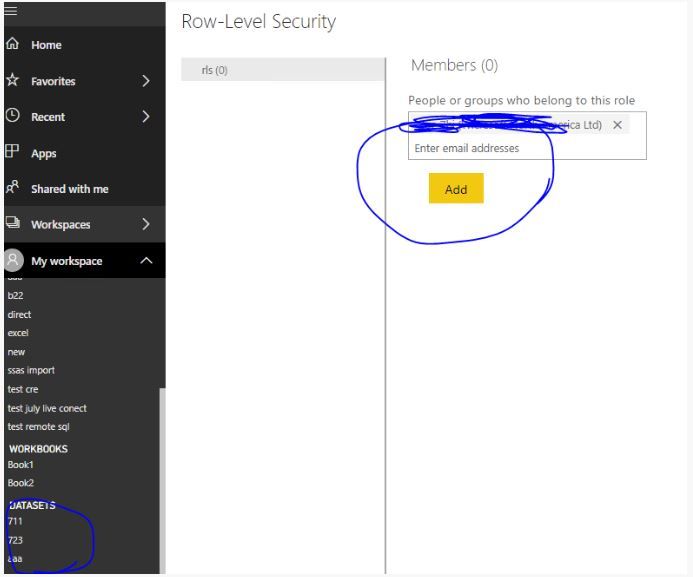
1. there should be RLS in this report, please add the users into rls setting
https://docs.microsoft.com/en-us/power-bi/service-admin-rls
2. and please check the permission of this dataset as below:
https://docs.microsoft.com/en-us/power-bi/service-datasets-build-permissions
Regards,
Lin
Please check:
1. there should be RLS in this report, please add the users into rls setting
https://docs.microsoft.com/en-us/power-bi/service-admin-rls
2. and please check the permission of this dataset as below:
https://docs.microsoft.com/en-us/power-bi/service-datasets-build-permissions
Regards,
Lin
Your report contains Row-Level security. You have to add all the users to the Roles as well. Then only they can access the report. If you accidentally enabled the RLS, then remove the RLS from pbix file and re-publish it.
https://docs.microsoft.com/en-us/power-bi/admin/service-admin-rls#manage-security-on-your-model
Did I answer your question? Mark my post as a solution!
Appreciate with a kudos 🙂
Share feedback directly with Fabric product managers, participate in targeted research studies and influence the Fabric roadmap.
If you love stickers, then you will definitely want to check out our Community Sticker Challenge!
Check out the January 2026 Power BI update to learn about new features.
| User | Count |
|---|---|
| 19 | |
| 8 | |
| 7 | |
| 7 | |
| 7 |
| User | Count |
|---|---|
| 52 | |
| 46 | |
| 25 | |
| 25 | |
| 23 |