cancel
Showing results for 
Search instead for 
Did you mean: 

The Power BI Data Visualization World Championships is back! Get ahead of the game and start preparing now! Learn more

Reply
OneWithQuestion
Post Prodigy
Post Prodigy

Usage Metrics - how to get more than 30 days of data?

Is there anyway to get more than 30 days of usage metrics data?

Can I adjust a setting or store it elsewhere, tweak the connection to the audit logs?

Thank you!!!

1 ACCEPTED SOLUTION
NimaiAhluwalia
Continued Contributor

Hello @OneWithQuestion 


To answer your first question - Power BI generates a pre-built report with usage metrics for that content for the last 90 days.


As per my experience, you cannot adjust a setting or store it elsewhere, tweak the connection to the audit logs.


For clarity have a look at this

https://docs.microsoft.com/en-us/power-bi/collaborate-share/service-usage-metrics


IF MY SOLUTION HELPED YOU PLEASE DO HIT A LIKE AND ACCEPT IT AS A SOLUTION IF IT SOLVES YOUR ERROR!


View solution in original post

6 REPLIES 6
PatChan
Helper I
Helper I

Hi, my understanding is you can retrieve up to 30 days of usage metric data (60 days if it's personal workspace). You can, however, get up to 90 days/5000 records if you use audit logs from Power BI admin portal. Hope this clarifies.

HavenerTed
Advocate I
Advocate I

I really need to just get all historical usage metrics data. Is there an API call or something I can do to get this. It seems like if they had the 90 days before then surely the data for all time historical is available somewhere. If not, that is sort of ridiculous.

Anonymous
Not applicable

I am running into the same issue as pawlowski6132 - I also only see usage metrics for the last 30 days, not 90.  

After further searching it appears this is normal if you are using the new "Improved" Usage report with the newer modern workspaces (rather than Classic). not sure I would call that an "improvement"

See https://docs.microsoft.com/en-us/power-bi/collaborate-share/service-modern-usage-metrics#customize-t...

"The improved usage metrics report only includes reports that have been opened in the past 30 days, while the previous version covers the past 90 days. If a report isn't included in the improved usage metrics report, it likely hasn't been used in more than 30 days."

v-xulin-mstf
Community Support
Community Support

Hi @OneWithQuestion


About Customize the usage metrics report, you can refer:

https://docs.microsoft.com/en-us/power-bi/collaborate-share/service-modern-usage-metrics#customize-t...

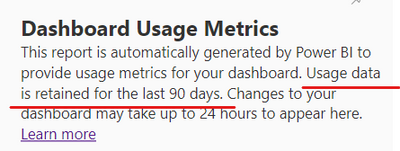
You can get usage data which is retained for the last 90 days.

v-xulin-mstf_1-1619677708509.png


Best Regards,
Link


If this post helps then please consider Accept it as the solution to help the other members find it more quickly.


It's not 90 days. It's 30 days. The question is, how to get as much as wanted? 

NimaiAhluwalia
Continued Contributor

Hello @OneWithQuestion 


To answer your first question - Power BI generates a pre-built report with usage metrics for that content for the last 90 days.


As per my experience, you cannot adjust a setting or store it elsewhere, tweak the connection to the audit logs.


For clarity have a look at this

https://docs.microsoft.com/en-us/power-bi/collaborate-share/service-usage-metrics


IF MY SOLUTION HELPED YOU PLEASE DO HIT A LIKE AND ACCEPT IT AS A SOLUTION IF IT SOLVES YOUR ERROR!


Helpful resources

Announcements
Power BI DataViz World Championships

Power BI Dataviz World Championships

The Power BI Data Visualization World Championships is back! Get ahead of the game and start preparing now!

December 2025 Power BI Update Carousel

Power BI Monthly Update - December 2025

Check out the December 2025 Power BI Holiday Recap!

FabCon Atlanta 2026 carousel

FabCon Atlanta 2026

Join us at FabCon Atlanta, March 16-20, for the ultimate Fabric, Power BI, AI and SQL community-led event. Save $200 with code FABCOMM.