
cancel
Showing results for 
Search instead for 
Did you mean: 

Next up in the FabCon + SQLCon recap series: The roadmap for Microsoft SQL and Maximizing Developer experiences in Fabric. All sessions are available on-demand after the live show. Register now

Reply
leightonweese
Regular Visitor

Usage Metrics Save a Copy

Hello,


When I open usage metrics reports on the PBI service, I do not see the option under File to Save a Copy. Any ideas what might cause this? I am a workspace admin with a Pro license.

4 REPLIES 4
v-kkf-msft
Community Support
Community Support

Hi @leightonweese ,


Has your problem been solved? If it is solved, please mark a reply which is helpful to you.


If the problem is still not resolved, please provide detailed error information or the expected result you expect. Let me know immediately, looking forward to your reply.


Best Regards,
Winniz

v-kkf-msft
Community Support
Community Support

Hi @leightonweese ,


1. Are you using the classic workspace or the new workspace?
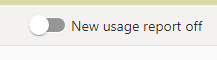
2. If it's a new workspace, are you viewing the new usage report or the old usage report? Is the "Save a copy" option not visible under either mode?

vkkfmsft_0-1647312927080.png

3. Do other reports in this workspace have the same problem? Do the same issues exist in other workspaces?


4. Let's try to remove the Usage Metrics v2 dataset, then you can run View Usage Metrics again to generate a new dataset with its associated improved usage metrics reports.. You can do that, using this rest API: Datasets - Delete Dataset In Group - REST API (Power BI Power BI REST APIs) | Microsoft Docs. You just needs to log in with your credentials in the 'Try It' section. 
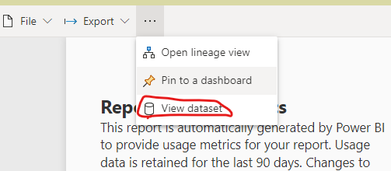
Open the use metrics report, select View dataset, and then you will get the Group ID and the Dataset ID.

vkkfmsft_1-1647314171555.png

vkkfmsft_2-1647314241214.png


If the problem is still not resolved, please provide detailed error information or the expected result you expect. Let me know immediately, looking forward to your reply.
Best Regards,
Winniz
If this post helps, then please consider Accept it as the solution to help the other members find it more quickly.


It worked for me, thank you
arvindsingh802
Super User
Super User

Usage Metrics report is Microsoft template report that's PBIX file is not available to download

You can create your own report by connecting to the dataset behind it.


If this post helps, then please consider Accept it as the solution, Appreciate your Kudos!!
Proud to be a Super User!!

Helpful resources

Announcements
New to Fabric survey Carousel

New to Fabric Survey

If you have recently started exploring Fabric, we'd love to hear how it's going. Your feedback can help with product improvements.

Power BI DataViz World Championships carousel

Power BI DataViz World Championships - June 2026

A new Power BI DataViz World Championship is coming this June! Don't miss out on submitting your entry.

Join our Fabric User Panel

Join our Fabric User Panel

Share feedback directly with Fabric product managers, participate in targeted research studies and influence the Fabric roadmap.

March Power BI Update Carousel

Power BI Community Update - March 2026

Check out the March 2026 Power BI update to learn about new features.

Top Solution Authors