Join us at FabCon Atlanta from March 16 - 20, 2026, for the ultimate Fabric, Power BI, AI and SQL community-led event. Save $200 with code FABCOMM.
Register now!The Power BI Data Visualization World Championships is back! Get ahead of the game and start preparing now! Learn more
Hi All,
1.In my report export underlying data in excel format is working. But it excluding some column in my table. That columns not a measure, it are direct column in table. why this excluding happen? What logic behind in export underlying data in excel format?
2. Underlying data columns are different from one page to another in same report
Ex: My report contains (A,B,C,D,E,F,G,H) column.
Page No. column in underlying data
1 A,B,D,E,F
2 A,B,D,E,F
3 A,D,E,F,G
see here 1,2,3 pages in same report. But export data is giving different columns in in page. Why this difference ? (missing fields are not measure. It is a column) Report and page level only filter data not a column. correct?
3.
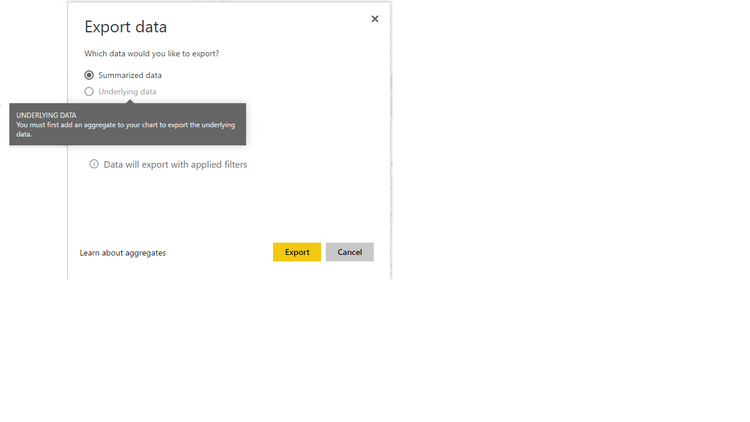
I am getting this error in some visuals. In this visual i am using only two columns and one measure.
then why underlying data is disabled and asking aggregate?
By
Gnanasekar
Solved! Go to Solution.
Question 1: If you set the column to "Hide in Report View", then this column will be excluded when export underlying data to excel file.
Question 2: I canot reproduce this issue, could please provide us some sample data and the detail steps to reproduce this issue, so that we can make further analysis.
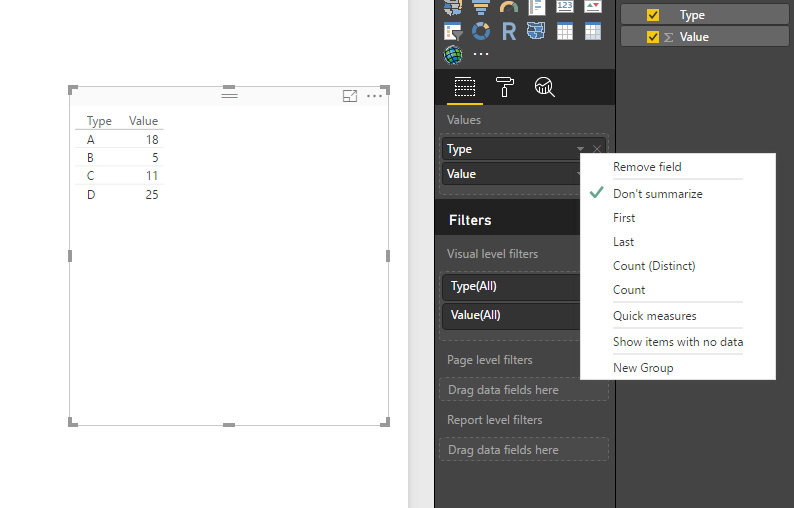
Question 3: If all column in your visual is set to "Don't Summarize", then you cannot use "Underlying Data" since all the data is un-aggregate.
Regards,
Charlie Liao
Question 1: If you set the column to "Hide in Report View", then this column will be excluded when export underlying data to excel file.
Question 2: I canot reproduce this issue, could please provide us some sample data and the detail steps to reproduce this issue, so that we can make further analysis.
Question 3: If all column in your visual is set to "Don't Summarize", then you cannot use "Underlying Data" since all the data is un-aggregate.
Regards,
Charlie Liao
In report backend has 24 columns (included 5 aggregate columns(A,B,C,D,E) "default category is SUM")
I am using B aggregate column in report. In export underlying data contained 20 columns. Only B aggregate column was present. Remaining 4 columns were excluded from underlying data in that report.
Why?
we can't get all aggregate column in underlying data without used in visual?
By
Gnanasekar
The Power BI Data Visualization World Championships is back! Get ahead of the game and start preparing now!
| User | Count |
|---|---|
| 56 | |
| 55 | |
| 37 | |
| 18 | |
| 14 |