cancel
Showing results for 
Search instead for 
Did you mean: 

The Power BI Data Visualization World Championships is back! Get ahead of the game and start preparing now! Learn more

Reply
Anonymous
Not applicable

Unable to connect Azure SQL under datamart with SSMS

Hi all, I am trying to connect Azure SQL under datamart with SSMS in order to backup the data on-premises. But I couldnt access it with the connection string provided by the datamart server setting in power bi service.


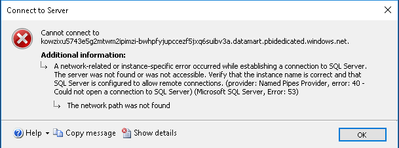
The connection error in ssms:

HeyWeAreOne_0-1655451355829.png


Server Type: Database engine

Authentication method: Azure Active Directory - Universal with MFA


Alternatively, is there better ways to backup data from datamart to on premises SQL server

1 ACCEPTED SOLUTION
v-luwang-msft
Community Support
Community Support

Hi @Anonymous ,

Please check if your gateway configuration is accurate. Please see the following related articles:

https://community.powerbi.com/t5/Service/Datamart-unable-to-connect-to-Azure-SQL-DB/m-p/2555310 

https://docs.microsoft.com/en-us/power-bi/transform-model/datamarts/datamarts-create-reports#create-reports-using-power-bi-desktop:~:text=Complete%20the%20following,in%20your%20dataset


And regarding the creation of a dataset from the datamart in the cloud, it auto generates one for you with direct query to build reports. In case you want to build them in a different workspace you need to be member or admin in the workspace of the datamart.


Did I answer your question? Mark my post as a solution!


Best Regards

Lucien

View solution in original post

3 REPLIES 3
Burtius13
New Member

Hi @Anonymous ,

Did you able to solve your issue? because I couldn't find a solution via accepted answer. Thanks in advance

v-luwang-msft
Community Support
Community Support

Hi @Anonymous ,

Has your problem been solved, if so, please consider Accept a correct reply as the solution or share your own solution to help others find it.

Best Regards
Lucien

v-luwang-msft
Community Support
Community Support

Hi @Anonymous ,

Please check if your gateway configuration is accurate. Please see the following related articles:

https://community.powerbi.com/t5/Service/Datamart-unable-to-connect-to-Azure-SQL-DB/m-p/2555310 

https://docs.microsoft.com/en-us/power-bi/transform-model/datamarts/datamarts-create-reports#create-reports-using-power-bi-desktop:~:text=Complete%20the%20following,in%20your%20dataset


And regarding the creation of a dataset from the datamart in the cloud, it auto generates one for you with direct query to build reports. In case you want to build them in a different workspace you need to be member or admin in the workspace of the datamart.


Did I answer your question? Mark my post as a solution!


Best Regards

Lucien

Helpful resources

Announcements
Power BI DataViz World Championships

Power BI Dataviz World Championships

The Power BI Data Visualization World Championships is back! Get ahead of the game and start preparing now!

December 2025 Power BI Update Carousel

Power BI Monthly Update - December 2025

Check out the December 2025 Power BI Holiday Recap!

FabCon Atlanta 2026 carousel

FabCon Atlanta 2026

Join us at FabCon Atlanta, March 16-20, for the ultimate Fabric, Power BI, AI and SQL community-led event. Save $200 with code FABCOMM.