Join us in Barcelona for FabCon and SQLCon, September 28 - October 1, 2026.
This is best Fabric, Power BI, SQL and AI community event. How do we know? The last event sold out! Save €200 with code FABCMTY200.
Register now- Power BI forums
- Get Help with Power BI
- Desktop
- Service
- Report Server
- Power Query
- Mobile Apps
- Developer
- DAX Commands and Tips
- Custom Visuals Development Discussion
- Health and Life Sciences
- Power BI Spanish forums
- Translated Spanish Desktop
- Training and Consulting
- Instructor Led Training
- Dashboard in a Day for Women, by Women
- Galleries
- Data Stories Gallery
- Themes Gallery
- Contests Gallery
- QuickViz Gallery
- Quick Measures Gallery
- Visual Calculations Gallery
- Fabric Apps Gallery
- Notebook Gallery
- Translytical Task Flow Gallery
- TMDL Gallery
- R Script Showcase
- Webinars and Video Gallery
- Ideas
- Custom Visuals Ideas (read-only)
- Issues
- Issues
- Events
- Upcoming Events
July 28 - August 9 | Final Round of the Power BI Dataviz World Championships. This is your chance. Learn more
- Power BI forums
- Forums
- Get Help with Power BI
- Service
- Time Calculation Report
- Subscribe to RSS Feed
- Mark Topic as New
- Mark Topic as Read
- Float this Topic for Current User
- Bookmark
- Subscribe
- Printer Friendly Page

- Mark as New
- Bookmark
- Subscribe
- Mute
- Subscribe to RSS Feed
- Permalink
- Report Inappropriate Content
Time Calculation Report
Hi Team,
we have a Data where we have time column I am getting the time in format of "HH:MM:SS" and my target hours for one shift is 8 hours we have 3 shifts A,B & C and we have 12 Production Stations Now I want to create the report where I can show Production Station active time by appliying shiftwise filter that in 8 hours how much time the perticular station is active Please find the attachment of time data.
I am not able to create the time calculation chart for this data.
Thanks yo
Solved! Go to Solution.


- Mark as New
- Bookmark
- Subscribe
- Mute
- Subscribe to RSS Feed
- Permalink
- Report Inappropriate Content
Hi @kiran123 ,
It is not supported to implement your demand in Power BI currently .There is an idea about this issue, please vote it up, field-of-duration-type, to improve the Power BI.
It is a place for customers provide feedback about Microsoft Office products . What’s more, if a feedback is high voted there by other customers, it will be promising that Microsoft Product Team will take it into consideration when designing the next version in the future.
We also submitted this feedback to the product group internally, so that the product group can pay attention to this problem and speed up the issue repairing.
Please reference: Display-duration-as-HH-MM-SS-on-Y-axis , Aggregating-Duration-Time ,Duration-as-Y-Axis .
To work around the issue, you can also use R visual.
library(ggplot2)
ggplot(data = dataset) + geom_bar(mapping = aes(x = Date, y = Column), stat = "identity")
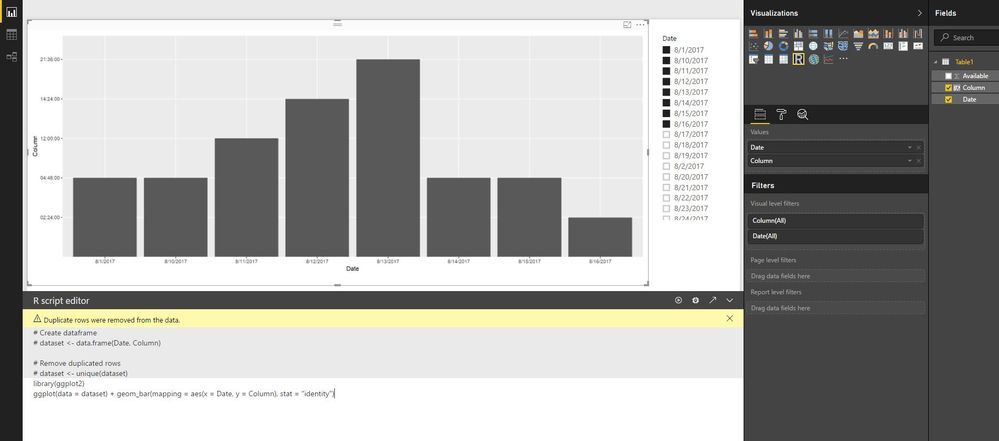
Best Regards,
Amy
If this post helps, then please consider Accept it as the solution to help the other members find it more quickly.
- Mark as New
- Bookmark
- Subscribe
- Mute
- Subscribe to RSS Feed
- Permalink
- Report Inappropriate Content
Hi @kiran123 ,
Does that make sense? If so, kindly mark my answer as a solution to help others having the similar issue and close the case. If not, let me know and I'll try to help you further.
Best regards
Amy
- Mark as New
- Bookmark
- Subscribe
- Mute
- Subscribe to RSS Feed
- Permalink
- Report Inappropriate Content
Hi @kiran123 ,
I am not sure what desired result would you want, could you please share your sample data and desired output screenshots for further analysis? You can also upload sample pbix to OneDrive and post the link here. Do mask sensitive data before uploading.
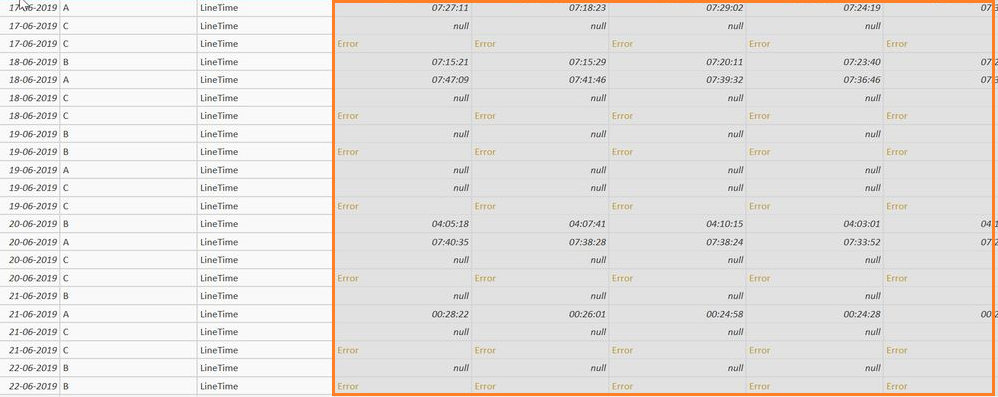
For example, what is these time columns in red box referred to ?
Please read this post to get your answer quickly: How to Get Your Question Answered Quickly.
Best Regards,
Amy
- Mark as New
- Bookmark
- Subscribe
- Mute
- Subscribe to RSS Feed
- Permalink
- Report Inappropriate Content
Hi
consider that time colums as a Operator Station1,Operator Station2....ETC
@v-xicai wrote:Hi @kiran123 ,
I am not sure what desired result would you want, could you please share your sample data and desired output screenshots for further analysis? You can also upload sample pbix to OneDrive and post the link here. Do mask sensitive data before uploading.
For example, what is these time columns in red box referred to ?
Please read this post to get your answer quickly: How to Get Your Question Answered Quickly.
Best Regards,
Amy
- Mark as New
- Bookmark
- Subscribe
- Mute
- Subscribe to RSS Feed
- Permalink
- Report Inappropriate Content
Hi @kiran123 ,
Enter into Query Editor, click on column Operator Station1- Station12, click "Unpivot Columns", rename this result column with "Operator Station". Don't forget to click the "Close & Apply" button.

Then could you please share desired output screenshots for further analysis?
Best Regards,
Amy
- Mark as New
- Bookmark
- Subscribe
- Mute
- Subscribe to RSS Feed
- Permalink
- Report Inappropriate Content
Hi,
I Want to know about how do I represent the time in any charts where I can show that say for example my target time is 8:00:00 hours
but in given data my achieved time is 7:23:00 fort the wk20,wk30 or op10,OP20,OP30 so on.
so that my seeing these chart user can easily understand that what our chart is showing.
- Mark as New
- Bookmark
- Subscribe
- Mute
- Subscribe to RSS Feed
- Permalink
- Report Inappropriate Content
Hi @kiran123 ,
It is not supported to implement your demand in Power BI currently .There is an idea about this issue, please vote it up, field-of-duration-type, to improve the Power BI.
It is a place for customers provide feedback about Microsoft Office products . What’s more, if a feedback is high voted there by other customers, it will be promising that Microsoft Product Team will take it into consideration when designing the next version in the future.
We also submitted this feedback to the product group internally, so that the product group can pay attention to this problem and speed up the issue repairing.
Please reference: Display-duration-as-HH-MM-SS-on-Y-axis , Aggregating-Duration-Time ,Duration-as-Y-Axis .
To work around the issue, you can also use R visual.
library(ggplot2)
ggplot(data = dataset) + geom_bar(mapping = aes(x = Date, y = Column), stat = "identity")
Best Regards,
Amy
If this post helps, then please consider Accept it as the solution to help the other members find it more quickly.
- Mark as New
- Bookmark
- Subscribe
- Mute
- Subscribe to RSS Feed
- Permalink
- Report Inappropriate Content
It is helps me but need the proper solution for this to show stationwise and daywise data

Helpful resources

FabCon & SQLCon – Barcelona 2026
Join us in Barcelona for FabCon and SQLCon, the Fabric, Power BI, SQL, and AI community event. Save €200 with code FABCMTY200.

Power BI Monthly Update - July 2026
Check out the July 2026 Power BI update to learn about new features.

Power BI DataViz World Championships - June 2026
A new Power BI DataViz World Championship is coming this June! Don't miss out on submitting your entry.

| User | Count |
|---|---|
| 11 | |
| 10 | |
| 9 | |
| 5 | |
| 5 |


