Learn from the best! Meet the four finalists headed to the FINALS of the Power BI Dataviz World Championships! Register now
We have extensive conversion done in M to display timeframe in YYYY-MM-DD format, because no such option exist.
Suddenly it started to go wrong after publish:
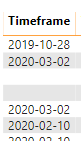
Column in PowerBI desktop In PowerBI desktop became
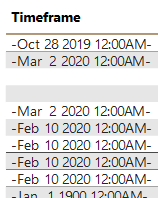
Published this after publish and sharing on PowerBI portal.
Data type is TEXT for these fields.
How can I fix this?
Solved! Go to Solution.
HI @Anonymous,
It seems like your date values stored as text format, but it seems to recognize and transforms to date value when you publish to power bi service side.
Have you tried to remove the old version publish it to confirm if this scenario still appears on your side? In addition, where are your data hosted? It may be caused by specific data region service.
How to Get Your Question Answered Quickly
Regards,
Xiaoxin Sheng
HI @Anonymous,
It seems like your date values stored as text format, but it seems to recognize and transforms to date value when you publish to power bi service side.
Have you tried to remove the old version publish it to confirm if this scenario still appears on your side? In addition, where are your data hosted? It may be caused by specific data region service.
How to Get Your Question Answered Quickly
Regards,
Xiaoxin Sheng
Deleted and re-published. Now works BUT, if I refresh by using service - it again as date time.
Where can I submit a ticket for PowerBI service bugfix?
A new Power BI DataViz World Championship is coming this June! Don't miss out on submitting your entry.
Share feedback directly with Fabric product managers, participate in targeted research studies and influence the Fabric roadmap.