Join us at FabCon Atlanta from March 16 - 20, 2026, for the ultimate Fabric, Power BI, AI and SQL community-led event. Save $200 with code FABCOMM.
Register now!The Power BI Data Visualization World Championships is back! Get ahead of the game and start preparing now! Learn more
I have a existing dashboard in which there a table with following source . Basically all the data in that dasboard is loading from sharepoint . Where I can find this foler
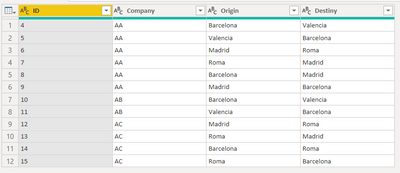
Table.FromRows(Json.Document(Binary.Decompress(Binary.FromText("i45WMlHSUXJ0BBJOiUXJqTn5eYlAdlhiTmpecmaiUqxOtJIpTAVcFFkxSIUZTIVvYkpRZgqQEZSfC5Eyh0mBReAqQFIW2GxGkrfEMBXVVkMDkAInfE43NIQpwel2QyOQEmesjjc0hslhut7QBCaHbDtCqymaViRbYwE=", BinaryEncoding.Base64), Compression.Deflate)), let _t = ((type text) meta [Serialized.Text = true]) in type table [ID = _t, Company = _t, Origin = _t, Destiny = _t]),
Solved! Go to Solution.
This is a manually added reference table that is packed up to save space. You can represent it simpler by using the #table syntax if you want.
#table({"ID","Company","Origin","Destiny"},
{{"4","AA","Barcelona","Valencia"},
{"5","AA","Valencia","Barcelona"},
{"6","AA","Madrid","Roma"},
{"7","AA","Roma","Madrid"},
{"8","AA","Barcelona","Madrid"},
{"9","AA","Madrid","Barcelona"},
{"10","AB","Barcelona","Valencia"},
{"11","AB","Valencia","Barcelona"},
{"12","AC","Madrid","Roma"},
{"13","AC","Roma","Madrid"},
{"14","AC","Barcelona","Roma"},
{"15","AC","Roma","Barcelona"}}
)
This is unrelated to Sharepoint.
This is a manually added reference table that is packed up to save space. You can represent it simpler by using the #table syntax if you want.
#table({"ID","Company","Origin","Destiny"},
{{"4","AA","Barcelona","Valencia"},
{"5","AA","Valencia","Barcelona"},
{"6","AA","Madrid","Roma"},
{"7","AA","Roma","Madrid"},
{"8","AA","Barcelona","Madrid"},
{"9","AA","Madrid","Barcelona"},
{"10","AB","Barcelona","Valencia"},
{"11","AB","Valencia","Barcelona"},
{"12","AC","Madrid","Roma"},
{"13","AC","Roma","Madrid"},
{"14","AC","Barcelona","Roma"},
{"15","AC","Roma","Barcelona"}}
)
This is unrelated to Sharepoint.
Hi, is this written manually or can it be generated through actions and applied steps...I am having a similar issue where I am trying to generate this source.
I have a query that is written:
= Table.FromRows(Json.Document(Binary.Decompress(Binary.FromText("i45WckpNLEpRitWJVnLJTy4NzkzPA3OCE3NSi9Pyi5JTFXwTi7JTSzLz0hWcc/JLU9ClwUyIlIKugnN+bm5pXmZJpUJAYlFJXmpRMX71QW6OCo6lJfm5iSWZ+ehW6wanFpVlAmkkiwMUQlITc5ViYwE=", BinaryEncoding.Base64), Compression.Deflate)), let _t = ((type nullable text) meta [Serialized.Text = true]) in type table [Team = _t])
Table.FromRows(Json.Document(Binary.Decompress(Binary.FromText("i45WMlHSUXJ0BBJOiUXJqTn5eYlAdlhiTmpecmaiUqxOtJIpTAVcFFkxSIUZTIVvYkpRZgqQEZSfC5Eyh0mBReAqQFIW2GxGkrfEMBXVVkMDkAInfE43NIQpwel2QyOQEmesjjc0hslhut7QBCaHbDtCqymaViRbYwE=", BinaryEncoding.Base64), Compression.Deflate)), let _t = ((type text) meta [Serialized.Text = true]) in type table [ID = _t, Company = _t, Origin = _t, Destiny = _t]),
Same process. Run it through a Base64 decoder and unzip it.
[["4","AA","Barcelona","Valencia"],["5","AA","Valencia","Barcelona"],["6","AA","Madrid","Roma"],["7","AA","Roma","Madrid"],["8","AA","Barcelona","Madrid"],["9","AA","Madrid","Barcelona"],["10","AB","Barcelona","Valencia"],["11","AB","Valencia","Barcelona"],["12","AC","Madrid","Roma"],["13","AC","Roma","Madrid"],["14","AC","Barcelona","Roma"],["15","AC","Roma","Barcelona"]]
Then parse it with the JSON parser.
Again, this is only to save some space. There is no other purpose.
Check out the November 2025 Power BI update to learn about new features.
Advance your Data & AI career with 50 days of live learning, contests, hands-on challenges, study groups & certifications and more!