FabCon is coming to Atlanta
Join us at FabCon Atlanta from March 16 - 20, 2026, for the ultimate Fabric, Power BI, AI and SQL community-led event. Save $200 with code FABCOMM.
Register now!- Power BI forums
- Get Help with Power BI
- Desktop
- Service
- Report Server
- Power Query
- Mobile Apps
- Developer
- DAX Commands and Tips
- Custom Visuals Development Discussion
- Health and Life Sciences
- Power BI Spanish forums
- Translated Spanish Desktop
- Training and Consulting
- Instructor Led Training
- Dashboard in a Day for Women, by Women
- Galleries
- Data Stories Gallery
- Themes Gallery
- Contests Gallery
- QuickViz Gallery
- Quick Measures Gallery
- Visual Calculations Gallery
- Notebook Gallery
- Translytical Task Flow Gallery
- TMDL Gallery
- R Script Showcase
- Webinars and Video Gallery
- Ideas
- Custom Visuals Ideas (read-only)
- Issues
- Issues
- Events
- Upcoming Events
Get Fabric Certified for FREE during Fabric Data Days. Don't miss your chance! Request now
- Power BI forums
- Forums
- Get Help with Power BI
- Service
- Re: Sql to powerbi direct query refresh only worki...
- Subscribe to RSS Feed
- Mark Topic as New
- Mark Topic as Read
- Float this Topic for Current User
- Bookmark
- Subscribe
- Printer Friendly Page

- Mark as New
- Bookmark
- Subscribe
- Mute
- Subscribe to RSS Feed
- Permalink
- Report Inappropriate Content
Sql to powerbi direct query refresh only working on numbere
Only the numbers seem to be update though. So the text, in this case Twitter comments, will not update unless I manually refresh the page. Any ideas? Thanks


- Mark as New
- Bookmark
- Subscribe
- Mute
- Subscribe to RSS Feed
- Permalink
- Report Inappropriate Content
Only dashboard tiles are able to auto refresh when there is data that is being refreshed. For reports you need to manually refresh the page.
As far as I am aware this is by design
- Mark as New
- Bookmark
- Subscribe
- Mute
- Subscribe to RSS Feed
- Permalink
- Report Inappropriate Content
Thanks for the reply. But like I said in the first post, I have done it as a dashboard with live tiles and as a report. The dashboard will update numbers only but will not update text/tables. So if you are trying to update live twitter comments which hit my SQL database it doesn't work....
So it's not a live dashboard if it's only for number IMO...
- Mark as New
- Bookmark
- Subscribe
- Mute
- Subscribe to RSS Feed
- Permalink
- Report Inappropriate Content
What happens if you pin the tables from the table to a dashboard and not pin the report as a live report.
If that works then I would suggest that be the option to move forward. I am not 100% sure why the tables are not auto updating.
- Mark as New
- Bookmark
- Subscribe
- Mute
- Subscribe to RSS Feed
- Permalink
- Report Inappropriate Content
Yes I saw other people comment that pinning the whole report doesn't work (which is also a shame btw). But I have been doing it with the individual tiles which also doesn't work.
I challenge anyone reading this, to get a table to update itself on a live dashboard...it simply cannot be done. So MS PBI is essentially saying the only live dashboard can be numbers only.... great if you happen to manage a local weather station...! 😉
- Mark as New
- Bookmark
- Subscribe
- Mute
- Subscribe to RSS Feed
- Permalink
- Report Inappropriate Content
- Mark as New
- Bookmark
- Subscribe
- Mute
- Subscribe to RSS Feed
- Permalink
- Report Inappropriate Content
What do you mean by above the live page? I have tried pinning a table as a live tile (individually) and it didn't work unless refreshed manually
Thanks
- Mark as New
- Bookmark
- Subscribe
- Mute
- Subscribe to RSS Feed
- Permalink
- Report Inappropriate Content
If you pin a table into a dashboard tile, it should refresh based on the refresh schedule you have defined in the dataset settings?
- Mark as New
- Bookmark
- Subscribe
- Mute
- Subscribe to RSS Feed
- Permalink
- Report Inappropriate Content
Feel like we're going round in circles 😉
All of these are pinned as tiles. Try it yourself sometime...! 😉
If you have an SQL database linked directly to a live dashboard, all the numbers will update either live (via push method) or every 15 mins via cache refresh.
The table will say it is refreshed in the tile but the data will not actually be refreshed from my experience unless you click refresh on the dashboard.
- Mark as New
- Bookmark
- Subscribe
- Mute
- Subscribe to RSS Feed
- Permalink
- Report Inappropriate Content
It appears so, the thing is that it does work for me. So not sure why the table is not working.
I dont think it would make a difference but did you try a matrix?
- Mark as New
- Bookmark
- Subscribe
- Mute
- Subscribe to RSS Feed
- Permalink
- Report Inappropriate Content
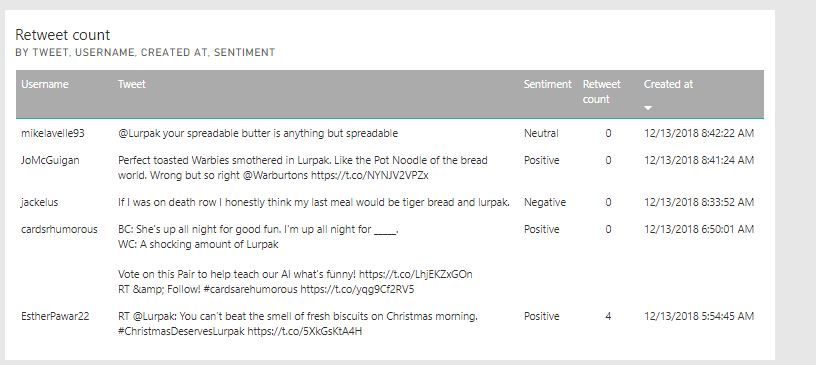
I think it's the type of table we are using - I presume yours is fixed? Mine is table of tweets (see below) so they update with time; meaning the length of the table grows and 'created at' has to be sorted to show the latest. So when it updates the screen will not update with the latest comments at the top, even though the data is refreshed.
- Mark as New
- Bookmark
- Subscribe
- Mute
- Subscribe to RSS Feed
- Permalink
- Report Inappropriate Content
If I take the sorting off then it won't show the latest comments so renders it useless then! :S
Thanks for ongoing engagement!
- Mark as New
- Bookmark
- Subscribe
- Mute
- Subscribe to RSS Feed
- Permalink
- Report Inappropriate Content
- Mark as New
- Bookmark
- Subscribe
- Mute
- Subscribe to RSS Feed
- Permalink
- Report Inappropriate Content
I think it does but obviously if you are trying to show the latest tweet or blog post, by not having the ability to sort renders it useless for this purpose
Helpful resources

Power BI Monthly Update - November 2025
Check out the November 2025 Power BI update to learn about new features.

Fabric Data Days
Advance your Data & AI career with 50 days of live learning, contests, hands-on challenges, study groups & certifications and more!

FabCon Atlanta 2026
Join us at FabCon Atlanta, March 16-20, for the ultimate Fabric, Power BI, AI and SQL community-led event. Save $200 with code FABCOMM.


