cancel
Showing results for 
Search instead for 
Did you mean: 

The Power BI Data Visualization World Championships is back! Get ahead of the game and start preparing now! Learn more

Reply
Victormar
Helper V
Helper V

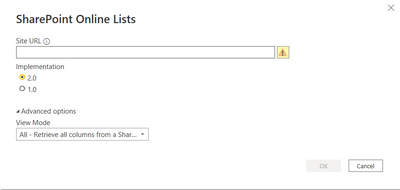
SharePoint Online Lists Implementation 2.0

Hi all,


I am trying to create some dataflows on the service, as moving some Power Query stuff I have done in Desktop. My main question is that I can't find how to define the implementation when creating a dataflow, as if I do with the 1.0 I have problems with timezone.


Is it possible to choose the implementation when creating a dataflow?

Victormar_0-1657114438030.png


Thanks in advance 🙂

1 ACCEPTED SOLUTION
otravers
Community Champion
Community Champion

I just tested it and creating a SharePoint Online list query in a dataflow doesn't specify the implementation version, but it is accepting an explicit 2.0 query pasted from Power BI Desktop. Here's the difference in the Source step:


SharePoint.Tables("https://yourdomain.sharepoint.com/", [Implementation="2.0", ViewMode="Default"])
 
Values accepted for Implementation are null and 2.0, looks like null means 1.0. Dataflow queries created with the UI don't specify Implementation at all, Power BI Desktop do.
------------------------------------------------
1. How to get your question answered quickly - good questions get good answers!
2. Learning how to fish > being spoon-fed without active thinking.
3. Please accept as a solution posts that resolve your questions.
------------------------------------------------
BI Blog: Datamarts | RLS/OLS | Dev Tools | Languages | Aggregations | XMLA/APIs | Field Parameters | Custom Visuals

View solution in original post

2 REPLIES 2
otravers
Community Champion
Community Champion

I just tested it and creating a SharePoint Online list query in a dataflow doesn't specify the implementation version, but it is accepting an explicit 2.0 query pasted from Power BI Desktop. Here's the difference in the Source step:


SharePoint.Tables("https://yourdomain.sharepoint.com/", [Implementation="2.0", ViewMode="Default"])
 
Values accepted for Implementation are null and 2.0, looks like null means 1.0. Dataflow queries created with the UI don't specify Implementation at all, Power BI Desktop do.
------------------------------------------------
1. How to get your question answered quickly - good questions get good answers!
2. Learning how to fish > being spoon-fed without active thinking.
3. Please accept as a solution posts that resolve your questions.
------------------------------------------------
BI Blog: Datamarts | RLS/OLS | Dev Tools | Languages | Aggregations | XMLA/APIs | Field Parameters | Custom Visuals

That worked really good! Thanks 🙂

Helpful resources

Announcements
Power BI DataViz World Championships

Power BI Dataviz World Championships

The Power BI Data Visualization World Championships is back! Get ahead of the game and start preparing now!

December 2025 Power BI Update Carousel

Power BI Monthly Update - December 2025

Check out the December 2025 Power BI Holiday Recap!

FabCon Atlanta 2026 carousel

FabCon Atlanta 2026

Join us at FabCon Atlanta, March 16-20, for the ultimate Fabric, Power BI, AI and SQL community-led event. Save $200 with code FABCOMM.