

cancel
Showing results for 
Search instead for 
Did you mean: 

Did you hear? There's a new SQL AI Developer certification (DP-800). Start preparing now and be one of the first to get certified. Register now

Reply
WaldemarWiec
New Member

SharePoint Excel files import issue

Hi,


I am importing a set of Excel files from SherePoint site to Power BI app. It worked perfectly until last week. Then in Power Bi data source tables I discovered "doubled" files (Source.Name) like this:


FileName.xlsm

FileName_CD51E136-2F49-445F-9300-4435182131422021-12-02T03-21-10.xlsm


the second one looks like some old version of the first one. It is not seen in the SharePoint directory and I cannot track it in any way.

I found the walkthrough filtering this out manually, but this is not a perfect solution. Does enyone  meet such an issue?

2 REPLIES 2
v-kkf-msft
Community Support
Community Support

Hi @WaldemarWiec ,


Has your problem been solved? If it is solved, please mark a reply which is helpful to you.


If the problem is still not resolved, please provide detailed error information or the expected result you expect. Let me know immediately, looking forward to your reply.


Best Regards,
Winniz

v-kkf-msft
Community Support
Community Support

Hi @WaldemarWiec ,


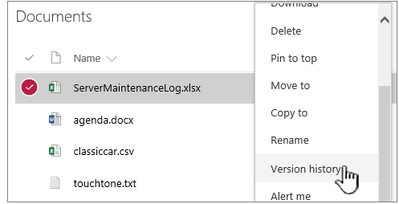
You can check in SharePoint to see if it is in the historical version of the file. 


vkkfmsft_0-1642750852917.png


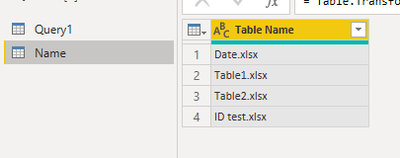
Just as a workaround, you could create a table [Name] containing the names of the excel files you want to import, like this.


vkkfmsft_1-1642752016087.png


Then add the following code in the advanced editor of the SharePoint data source to filter the excel files contained in table [Name].


 #"Selected Rows" = Table.SelectRows(#"Filtered Rows", each List.Contains(Name[Table Name], [Name]) )

vkkfmsft_2-1642752154568.png

vkkfmsft_3-1642752178750.png


If the problem is still not resolved, please provide detailed error information or the expected result you expect. Let me know immediately, looking forward to your reply.
Best Regards,
Winniz
If this post helps, then please consider Accept it as the solution to help the other members find it more quickly.

Helpful resources

Announcements
April Power BI Update Carousel

Power BI Monthly Update - April 2026

Check out the April 2026 Power BI update to learn about new features.

Fabric SQL PBI Data Days

Data Days 2026 coming soon!

Sign up to receive a private message when registration opens and key events begin.

New to Fabric survey Carousel

New to Fabric Survey

If you have recently started exploring Fabric, we'd love to hear how it's going. Your feedback can help with product improvements.

Power BI DataViz World Championships carousel

Power BI DataViz World Championships - June 2026

A new Power BI DataViz World Championship is coming this June! Don't miss out on submitting your entry.