Get certified for free when you join Fabric Data Days 2026 and dive into Fabric, Power BI, SQL, AI, and other essential data skills.
Join nowTry your skills in the Power BI Dataviz World Championship! Round one ends June 26. Join now
Hi everyone,
I have a spreadsheet connected to PBI desktop and the gateway for service.
When the dataset is refreshed through the service, the date format changes from DD/MM/YYY to MM/DD/YYYY - BUT the weird part being that it only does it for days between the 5th of the month and the 13th. I checked the data for the last few months and it is consistent with this..
When I download the pbix file from service it shows the same (incorrect) visual, but when I refresh it through desktop it corrects itself.
Has anybody seen this issue or know how to correct it?
Thank you,
If you could try to update the power bi desktop to the latest version and try it again.
https://www.microsoft.com/en-us/download/details.aspx?id=58494
and you could also change the date type with locale
https://radacad.com/flawless-date-conversion-in-power-query
Regards,
Lin
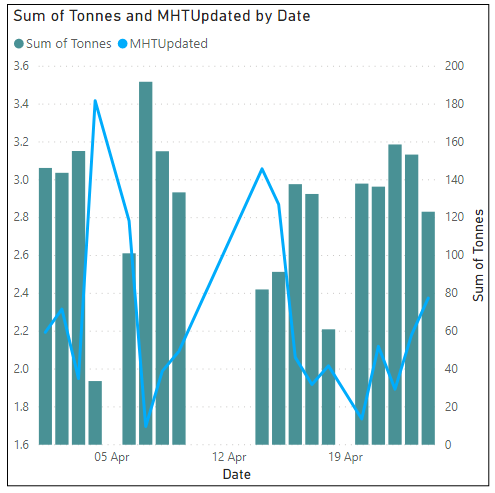
This is what's happening:
On desktop is looks fine, like this:
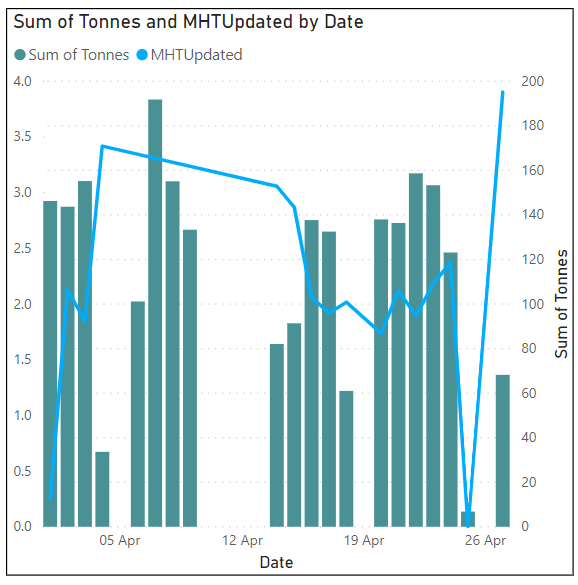
When I publish to service, the date format from the 5th to the 13th change for each month... like so
This is happening for each month, which you can see in the plateaus...
I'm not sure why the dates are only changing for a specific date... @v-lili6-msft
Try to change the visual to table visual to see if it works well.
Regards,
Lin
Don't miss out on Data Days, June 15 through August 7. Learn Fabric, Power BI, SQL, AI and more.
Check out the May 2026 Power BI update to learn about new features.
| User | Count |
|---|---|
| 16 | |
| 11 | |
| 11 | |
| 8 | |
| 7 |
| User | Count |
|---|---|
| 41 | |
| 36 | |
| 35 | |
| 35 | |
| 20 |