cancel
Showing results for 
Search instead for 
Did you mean: 

Try your skills in the Power BI Dataviz World Championship! Round one ends June 26. Join now

Reply
CROKat
New Member

Separating data from SharePoint List

I used the Integrate feature to create a Power BI visual using data from a SharePoint List. One column in the list is multiple selection people profiles. When this column is shown in Power BI, it combines the two people in the assigned column, but I'd like to keep them separate. Kind of hard to explain so I am attaching screenshots. 


CROKat_0-1695419839067.png

This is the List. It shows that K.S. is assigned to two projects solo, and one project with H.K. (who is also assigned one solo project). I would like it to show up in Power BI as K.S. is assigned to 3 projects and H.K. is assigned to 2 projects. Instead, it combines them in the report:
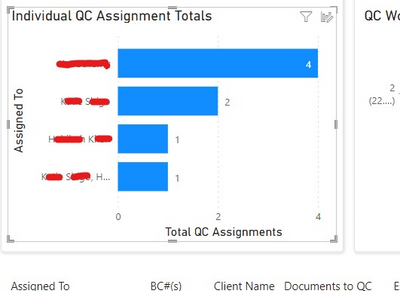
CROKat_1-1695420047103.png


Is it possible to separate them out?

4 REPLIES 4
christinepayton
Most Valuable Professional

Honestly I prefer connecting directly to the SP list vs using the "integrate" feature - you get more control of the data. If you use the SP Online List connector, it will let you expand the "people" data fields to new rows, get their name, department, job title, etc - it's much better to work with.


I did a video here on how to connect to SP lists that includes how to get people data into a dimension table so that you can interact with it in the way you're asking: https://youtu.be/LYu3wqb2Nx4?si=xxo34YYWcZ57htVM 

Yeah, unless you have thousands of users in your User Information List.  Expanding columns is an expensive action.

christinepayton
Most Valuable Professional

Yeah, the new flat architecture seems to help with this some - not having to support a massive number of subsites does wonders for keeping things to a reasonable size. 

lbendlin
Super User
Super User

You would use Power query action to separate the list entries of the users (split column...into rows).

Helpful resources

Announcements
Fabric Data Days is here Carousel

Fabric Data Days 2026

Don't miss out on Data Days, June 15 through August 7. Learn Fabric, Power BI, SQL, AI and more.

Power BI DataViz World Championships carousel

Power BI DataViz World Championships - June 2026

A new Power BI DataViz World Championship is coming this June! Don't miss out on submitting your entry.