cancel
Showing results for 
Search instead for 
Did you mean: 

We've captured the moments from FabCon & SQLCon that everyone is talking about, and we are bringing them to the community, live and on-demand. Starts on April 14th. Register now

Reply
Anonymous
Not applicable

Send delete rows from webapp

Hello,

I am using webapp which runs a c# apllication and sends real-time data and stream analytics and stream anaytics send processed data to powerbi app.

Is there any way to send deleterows commend from webapp to power bi app?

I know there is c# api and explanined in this link:https://msdn.microsoft.com/en-us/library/mt238041.aspx

However I can not follow this approach because for now, it is impossible for me to create Azure active directory.

Many thanks


1 ACCEPTED SOLUTION
v-qiuyu-msft
Community Support
Community Support

Hi @Anonymous,


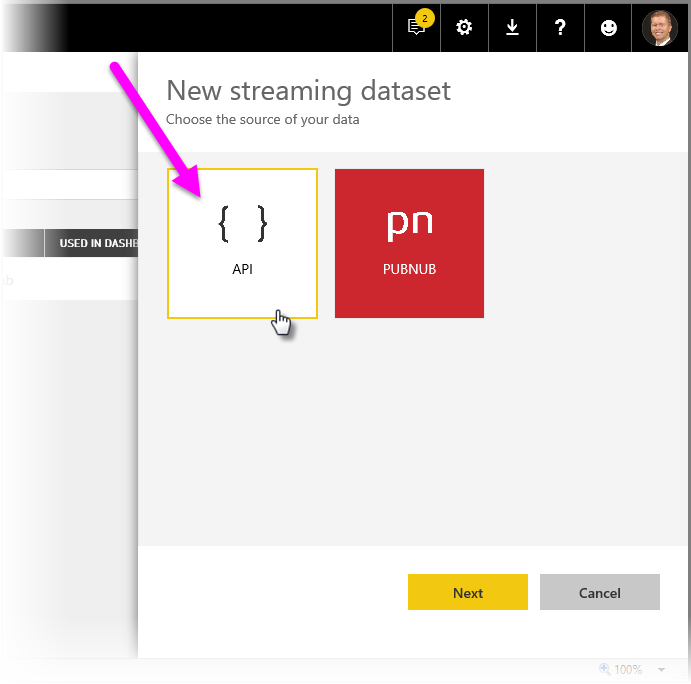
With a streaming dataset (assume you create a streaming dataset via API option in above image), there is no underlying database, so you cannot make use of any report functionality such as filtering, custom visuals, and other report functions. It’s a temporary cache which will expires quickly (in one hour) so you can not perform any delete operation on it. The temporary cache is only used to display visuals which have some transient sense of history. You can not access cache.


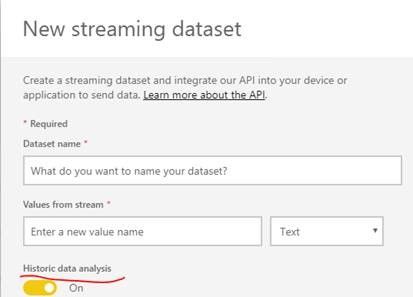
If you enable Historic data analysis, it becomes a pushstreaming dataset, and we can 

delete rows from “PushStreaming” datasets using REST API. But it requires Azure Active Directory authentication. 
 

historic.jpg


  string uri = @"https://api.powerbi.com/v1.0/myorg/datasets/{dataset id}/tables/RealTimeData/Rows";

            HttpWebRequest request = System.Net.WebRequest.Create(uri) as System.Net.HttpWebRequest;

            request.KeepAlive = true;

            request.Method = "DELETE";

            request.ContentLength = 0;

            request.ContentType = "application/json";

            request.Headers.Add("Authorization", String.Format("Bearer {0}", token));

            //Get HttpWebResponse from GET request 

            using (HttpWebResponse httpResponse = request.GetResponse() as System.Net.HttpWebResponse)

            {

                //Get StreamReader that holds the response stream 

                using (StreamReader reader = new System.IO.StreamReader(httpResponse.GetResponseStream()))

                {

                    string responseContent = reader.ReadToEnd();

                }

            }


If you are creating a pushstreaming dataset and you don't have Azure AD, it's not possible to delete rows from the dataset. 


Best Regards,
Qiuyun Yu 

Community Support Team _ Qiuyun Yu
If this post helps, then please consider Accept it as the solution to help the other members find it more quickly.

View solution in original post

2 REPLIES 2
v-qiuyu-msft
Community Support
Community Support

Hi @Anonymous,


With a streaming dataset (assume you create a streaming dataset via API option in above image), there is no underlying database, so you cannot make use of any report functionality such as filtering, custom visuals, and other report functions. It’s a temporary cache which will expires quickly (in one hour) so you can not perform any delete operation on it. The temporary cache is only used to display visuals which have some transient sense of history. You can not access cache.


If you enable Historic data analysis, it becomes a pushstreaming dataset, and we can 

delete rows from “PushStreaming” datasets using REST API. But it requires Azure Active Directory authentication. 


historic.jpg


  string uri = @"https://api.powerbi.com/v1.0/myorg/datasets/{dataset id}/tables/RealTimeData/Rows";

            HttpWebRequest request = System.Net.WebRequest.Create(uri) as System.Net.HttpWebRequest;

            request.KeepAlive = true;

            request.Method = "DELETE";

            request.ContentLength = 0;

            request.ContentType = "application/json";

            request.Headers.Add("Authorization", String.Format("Bearer {0}", token));

            //Get HttpWebResponse from GET request 

            using (HttpWebResponse httpResponse = request.GetResponse() as System.Net.HttpWebResponse)

            {

                //Get StreamReader that holds the response stream 

                using (StreamReader reader = new System.IO.StreamReader(httpResponse.GetResponseStream()))

                {

                    string responseContent = reader.ReadToEnd();

                }

            }


If you are creating a pushstreaming dataset and you don't have Azure AD, it's not possible to delete rows from the dataset. 


Best Regards,
Qiuyun Yu 

Community Support Team _ Qiuyun Yu
If this post helps, then please consider Accept it as the solution to help the other members find it more quickly.
v-qiuyu-msft
Community Support
Community Support

Hi @Anonymous,


Based on my understanding, you are creating a streaming dataset via stream dataset UI, right? 


real-time-streaming_0b.png


I have sent a email to consult this issue internally, will update here once I get any information. 


Best Regards,
Qiuyun Yu 

Community Support Team _ Qiuyun Yu
If this post helps, then please consider Accept it as the solution to help the other members find it more quickly.
Helpful resources

Announcements
New to Fabric survey Carousel

New to Fabric Survey

If you have recently started exploring Fabric, we'd love to hear how it's going. Your feedback can help with product improvements.

Power BI DataViz World Championships carousel

Power BI DataViz World Championships - June 2026

A new Power BI DataViz World Championship is coming this June! Don't miss out on submitting your entry.

Join our Fabric User Panel

Join our Fabric User Panel

Share feedback directly with Fabric product managers, participate in targeted research studies and influence the Fabric roadmap.

March Power BI Update Carousel

Power BI Community Update - March 2026

Check out the March 2026 Power BI update to learn about new features.