cancel
Showing results for 
Search instead for 
Did you mean: 

The Power BI Data Visualization World Championships is back! Get ahead of the game and start preparing now! Learn more

Reply
GuestUser
Helper V
Helper V

Selecting Multiple Values in Filters

Hi,


We have connected Power BI to SSAS - Connect Live Option


We are trying to create one report where a specific filter condition needs to be added (too many values in filters)


eg : Column1 , Column 2 , Column 3 , Column 4  --- in Report View 


where Column4 = Value 1 , Value 2 , Value 3 , Value 7 , Value 9.....Value 98  --- Filter Condition


In filtering , i have the option to click on check boxes for different values..(Value1 , value2 etc) but it becomes very tedious when we have more values (say 90 values)


Is there any better option to do?

5 REPLIES 5
v-xicai
Community Support
Community Support

Hi  @GuestUser  ,


Does that make sense? If so, kindly mark the proper reply as a solution to help others having the similar issue and close the case. If not, let me know and I'll try to help you further.


Best regards

Amy

v-xicai
Community Support
Community Support

Hi @GuestUser ,


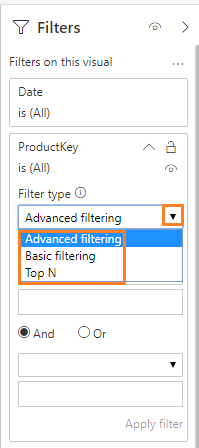
You may choose an appropriate filter type for your visual fields in Filters pane, see more: Power BI Filter Pane.

87.png


Best Regards,

Amy


Community Support Team _ Amy

If this post helps, then please consider Accept it as the solution to help the other members find it more quickly.

venal
Memorable Member
Memorable Member

@GuestUser 

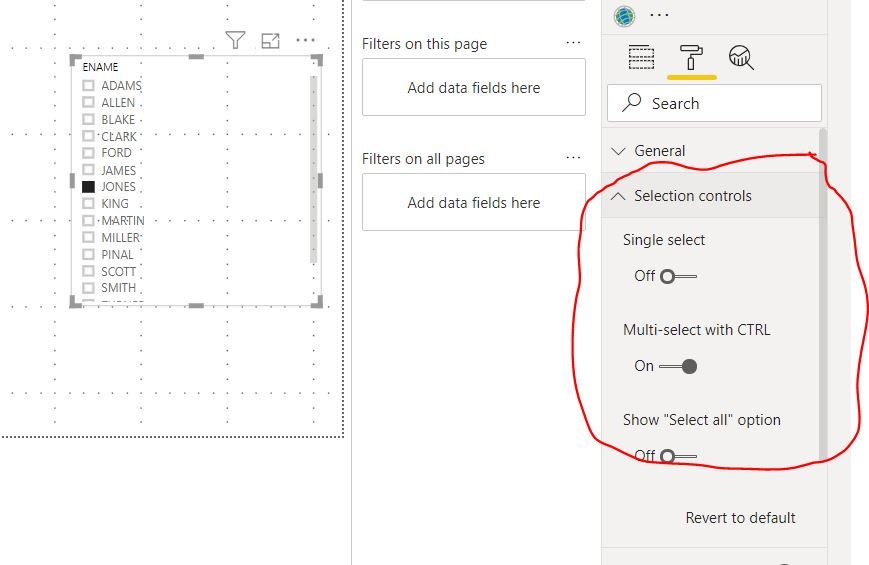
Have you tried the below settings.

Filter-Multi Selection Values.JPG

If you have any queries, please let us know.


If this post helps, then please consider Accept it as the solution to help the other members find it more


If this post was helpful may I ask you to mark it as solution and click on thumb symbol?


BR,

Venal.

Thanks !!


But my question is how can we add/select multiple values in filters in an easy manner (when i have more values like if have to select 98 values out of 200) while creating a report


Currently I am clicking on each checkbox which is quite time consuming


Any suggestions pls?


Anonymous
Not applicable

I recommend adding a filter to all pages or the whole page if the filter is consistent.


Otherwise, it may be worthwhile to create an excel file with a helper column, upload that, create a relationship, and filter based on the helper column.

Helpful resources

Announcements
November Power BI Update Carousel

Power BI Monthly Update - November 2025

Check out the November 2025 Power BI update to learn about new features.

Fabric Data Days Carousel

Fabric Data Days

Advance your Data & AI career with 50 days of live learning, contests, hands-on challenges, study groups & certifications and more!

FabCon Atlanta 2026 carousel

FabCon Atlanta 2026

Join us at FabCon Atlanta, March 16-20, for the ultimate Fabric, Power BI, AI and SQL community-led event. Save $200 with code FABCOMM.