Get certified for free when you join Fabric Data Days 2026 and dive into Fabric, Power BI, SQL, AI, and other essential data skills.
Join nowJuly 28 - August 9 | Final Round of the Power BI Dataviz World Championships. This is your chance. Learn more
Hi PoweBI community,
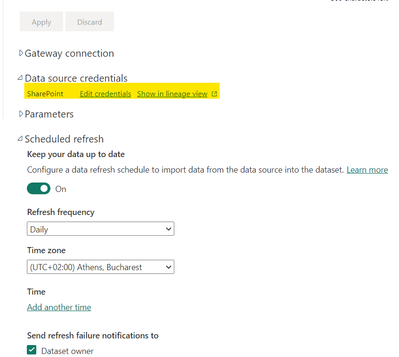
I am having trouble configuring a scheduled refresh for my dashboard. It reports that the data has been refreshed (both in the data set and the report), but it isn't accurate and there is no change to the data in the dashboard. I can only get it working when I manually refresh it in the desktop app and republish the data to the service.
My data source credentials are excel sheets in SharePoint that I configure for a daily refresh.
Would you be able to help me understand why the dashboard data doesn't refresh? Let me know if you need any further information.
Thanks,
Tal
Solved! Go to Solution.
Hi,
You need to specify a time :
Under Time click on "Add another time", then choose a time for the refresh.
Then click on "Apply".
The dataset will then refresh Daily at the time you specify. You can add additional times if you want it to refresh multiple times per day.
Hi,
You need to specify a time :
Under Time click on "Add another time", then choose a time for the refresh.
Then click on "Apply".
The dataset will then refresh Daily at the time you specify. You can add additional times if you want it to refresh multiple times per day.
If you love stickers, then you will definitely want to check out our community sticker challenge, Barcelona edition!
Check out the July 2026 Power BI update to learn about new features.
| User | Count |
|---|---|
| 10 | |
| 10 | |
| 9 | |
| 9 | |
| 5 |