cancel
Showing results for 
Search instead for 
Did you mean: 

The Power BI Data Visualization World Championships is back! Get ahead of the game and start preparing now! Learn more

Reply
cmotisi
New Member

Schedule Refresh with ODBC Source

HI,

I have a problem to schedule a refresh of data with ODBC Source.

I have an on-premise data gateway (not personal) installed on machine. When I configure gateway and Datasource on Manage Gateway Section the messagges that apper are:

- On Gateway Settings:  "Online: You are good to go"

- Data Source Settings: "Connection Successfull"

If I try to schedule refresh on dataset of myReport, Power BI show this error message:


You don't have any gateway installed or configured for the data sources in this dataset. Please install a new personal gateway or configure the data source for an existing data gateway.


Also, in Gateway connection section I can't select the Gatway because the selection is disabled.

NOTE: Datasource on Gateway is the same as DataSource on Report.


Can someone help me?

1 ACCEPTED SOLUTION
Anonymous
Not applicable

@cmotisi,

Do you connect to Excel/csv files stored in SharePoint Online?

If so, you are combining online data sources and on-premises data source in a single dataset, in this scenario, you would need to use personal gateway instead of on-premises gateway to refresh your dataset as currently on-premises gateway doesn't support OAuth type authentication and thus it is not possible to add the Excel/CSV data source withine on-premises gateway.

However if you connect to Excel/csv files tored in on-premises SharePoint, please add the Excel/csv data source within on-premises gateway, then you will be able to use on-premises gateway to refresh your dataset.

Regards,
Lydia

View solution in original post

4 REPLIES 4
Anonymous
Not applicable

@cmotisi,

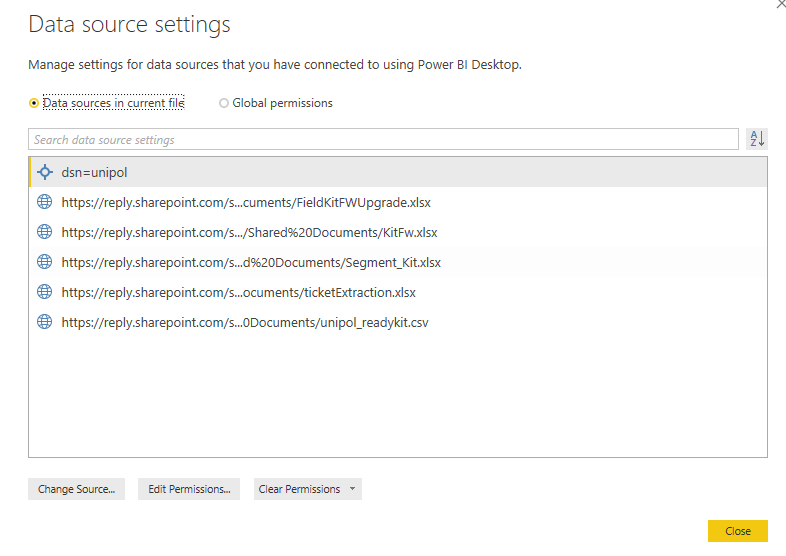
Does your dataset only contain the ODBC data source? Please go to File -> Options and settings ->Data source settings in Power BI Desktop to check data sources and post a screenshot about the data sources.

Besides, please post a screenshot about the connection string you use to connect to ODBC data source under on-premises gateway.

There is also a similar thread about how to add ODBC data source within on-premises gateway for your reference.

Regards,
Lydia

My dataset contains ad ODBC Datasource and excel/csv datasouce, like following:


DS.PNG


Thank's

Claudio


Anonymous
Not applicable

@cmotisi,

Do you connect to Excel/csv files stored in SharePoint Online?

If so, you are combining online data sources and on-premises data source in a single dataset, in this scenario, you would need to use personal gateway instead of on-premises gateway to refresh your dataset as currently on-premises gateway doesn't support OAuth type authentication and thus it is not possible to add the Excel/CSV data source withine on-premises gateway.

However if you connect to Excel/csv files tored in on-premises SharePoint, please add the Excel/csv data source within on-premises gateway, then you will be able to use on-premises gateway to refresh your dataset.

Regards,
Lydia

Yes, I Connect to Excel/Csv files on SharePoint Online on Office365.

I'll try to install a personal gateway.


Regards,
Claudio

Helpful resources

Announcements
Power BI DataViz World Championships

Power BI Dataviz World Championships

The Power BI Data Visualization World Championships is back! Get ahead of the game and start preparing now!

December 2025 Power BI Update Carousel

Power BI Monthly Update - December 2025

Check out the December 2025 Power BI Holiday Recap!

FabCon Atlanta 2026 carousel

FabCon Atlanta 2026

Join us at FabCon Atlanta, March 16-20, for the ultimate Fabric, Power BI, AI and SQL community-led event. Save $200 with code FABCOMM.