Join us at FabCon Atlanta from March 16 - 20, 2026, for the ultimate Fabric, Power BI, AI and SQL community-led event. Save $200 with code FABCOMM.
Register now!The Power BI Data Visualization World Championships is back! Get ahead of the game and start preparing now! Learn more
Hi Community,
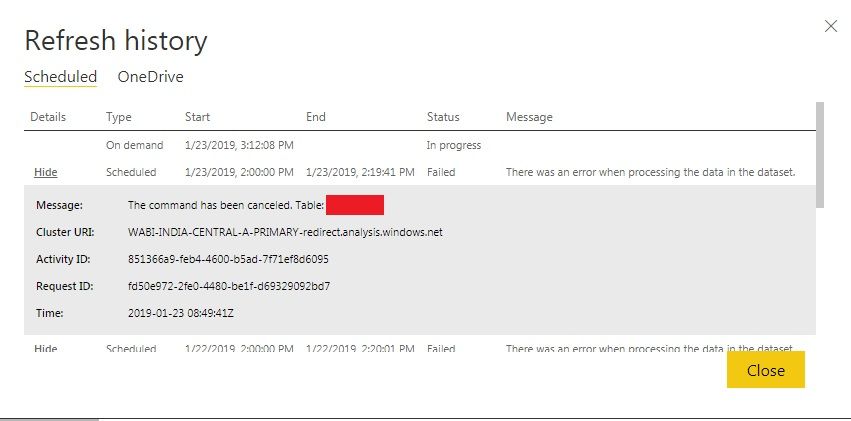
Can anyone help me to set Schedule Refresh for Azure Database. I am getting error as one of the dataset table is error.
By Reading Previous Issues regarding Azure Schedule Refresh I have deleted inactive Relationship, deleted Datasets in service and Republish it.
I am having about 14 tables from Azure Database, In that 4 tables are duplicate of previous loaded tables and 4 tables from Onedrive. So Totally,
Total Tables = 10 Table (Imported from Azure database) + 4 Tables (duplicate of Previous Loaded table (10) from Azure + 4 Tables (From Onedrive) = 18 Tables
Following Screenshot is my error when setting Schedule Refresh,
Thanks In Advance,
Sowmiyakrish
Hi @Sowmiya,
From your posted picture, the issue seems related to your error table. Please download the report from Power BI service and open it in Power BI desktop, click Refresh in desktop to see which detail error message display.
Regards,
Daniel He
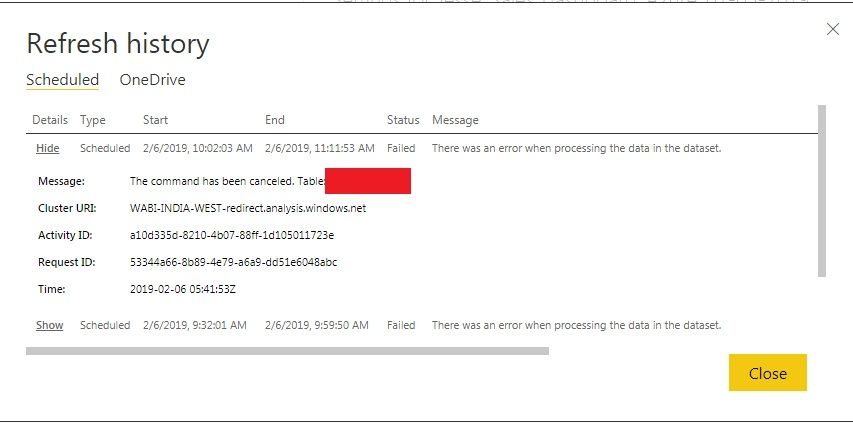
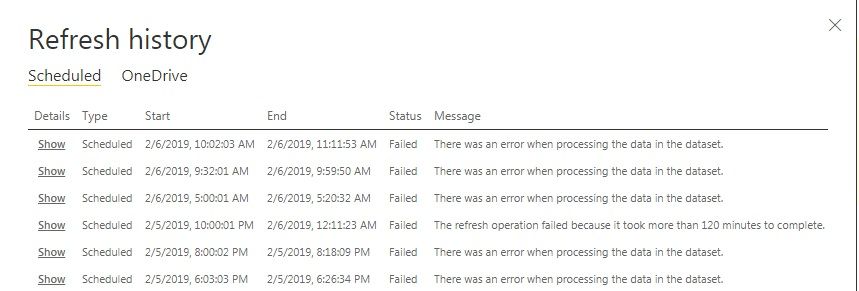
I have downloaded the file from Service and refreshed in Power BI Desktop. I didn't get any error in Desktop but while setting Schedule Refresh am getting same error that one of my table is error. Any Every Refresh am getting one of my table is error but those tables are important tables of my dashboard. Please help me with this. I am trying to set schedule refresh for Past 1 months. still now I am getting error.
Following are my errors,
Thanks In Advance,
Sowmiya
The Power BI Data Visualization World Championships is back! Get ahead of the game and start preparing now!
| User | Count |
|---|---|
| 56 | |
| 55 | |
| 36 | |
| 18 | |
| 14 |