This time we’re going bigger than ever. Fabric, Power BI, SQL, AI and more. We're covering it all. You won't want to miss it.
Learn moreLevel up your Power BI skills this month - build one visual each week and tell better stories with data! Get started
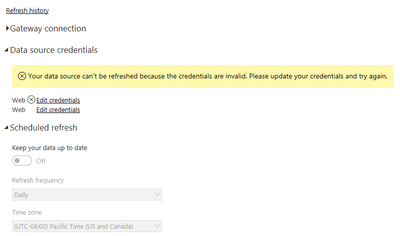
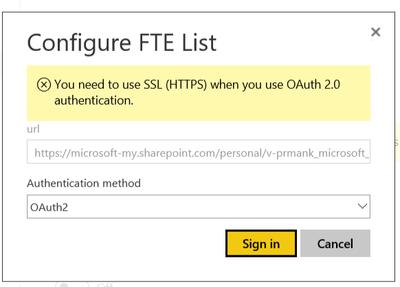
I have to excel workbooks("starts" and "Alias List" )in One Drive. I have imported both the workbooks into power bi desktop and merged both tables as i need alias names from Alias list onto Starts. After merging, i created reports and published to power bi online/service. Now, i am not able to schedule refresh and the error i am experiencing is "The Credentials are Invalid" but i am using the same credentials as i did to import the workbooks. Moreover, the credentials invalid is showing to only one work book. When i tried editing the credentials it gives me a pop up that i should have https. while my file is already https. Please help me , why i am getting this error? can't i schedule refresh for both workbooks?
Thanks in advance!
I would have expected that even though you had two files they should be able to be configured and refreshed. I have done it with one file with no issues.
Are the two files in the same folder?
I am able to schedule refresh with one file as well. The issue is raising when i have two files . Yes, both the files are in One Drive for Business not in folder but seperate files. what is with https? when my file path is https its still giving me that error?
Check out the April 2026 Power BI update to learn about new features.
Sign up to receive a private message when registration opens and key events begin.
If you have recently started exploring Fabric, we'd love to hear how it's going. Your feedback can help with product improvements.
| User | Count |
|---|---|
| 10 | |
| 9 | |
| 7 | |
| 6 | |
| 5 |
| User | Count |
|---|---|
| 24 | |
| 23 | |
| 22 | |
| 21 | |
| 20 |