cancel
Showing results for 
Search instead for 
Did you mean: 

Learn from the best! Meet the four finalists headed to the FINALS of the Power BI Dataviz World Championships! Register now

Reply
pranim
Helper I
Helper I

Schedule Refresh Not working

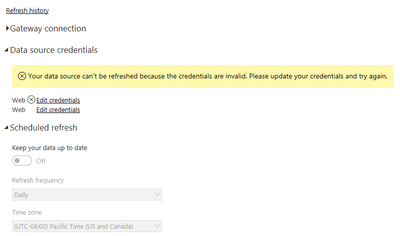
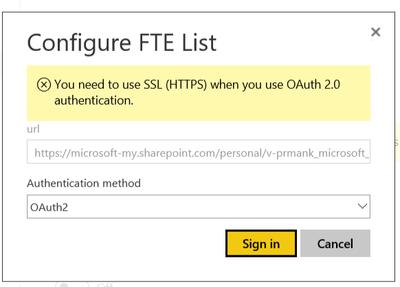
I have to excel workbooks("starts" and "Alias List" )in One Drive. I have imported both the workbooks into power bi desktop and merged both tables as i need alias names from Alias list onto Starts. After merging, i created reports and published to power bi online/service. Now, i am not able to schedule refresh and the error i am experiencing is "The Credentials are Invalid" but i am using the same credentials as i did to import the workbooks. Moreover, the credentials invalid is showing to only one work book. When i tried editing the credentials it gives me a pop up that i should have https. while my file is already https. Please help me , why i am getting this error? can't i schedule refresh for both workbooks?


Thanks in advance!

Credentials.PNGCapture.PNG 

5 REPLIES 5
GilbertQ
Super User
Super User

Is this OneDrive Personal or OneDrive for Business?


Did I answer your question? Mark my post as a solution!

Proud to be a Super User!


Power BI Blog

@GilbertQ


The worbooks are in One Drive for Business


Pranitha

I would have expected that even though you had two files they should be able to be configured and refreshed. I have done it with one file with no issues.


Are the two files in the same folder?


Did I answer your question? Mark my post as a solution!

Proud to be a Super User!


Power BI Blog

I am able to schedule refresh with one file as well. The issue is raising when i have two files . Yes, both the files are in One Drive for Business not in folder but seperate files. what is with https? when my file path is https its still giving me that error? 


I have not had any issues when using the HTTPS when connecting to OneDrive for Business.


Did I answer your question? Mark my post as a solution!

Proud to be a Super User!


Power BI Blog

Helpful resources

Announcements
Join our Fabric User Panel

Join our Fabric User Panel

Share feedback directly with Fabric product managers, participate in targeted research studies and influence the Fabric roadmap.

February Power BI Update Carousel

Power BI Monthly Update - February 2026

Check out the February 2026 Power BI update to learn about new features.