This time we’re going bigger than ever. Fabric, Power BI, SQL, AI and more. We're covering it all. You won't want to miss it.
Learn moreDid you hear? There's a new SQL AI Developer certification (DP-800). Start preparing now and be one of the first to get certified. Register now
Hello,
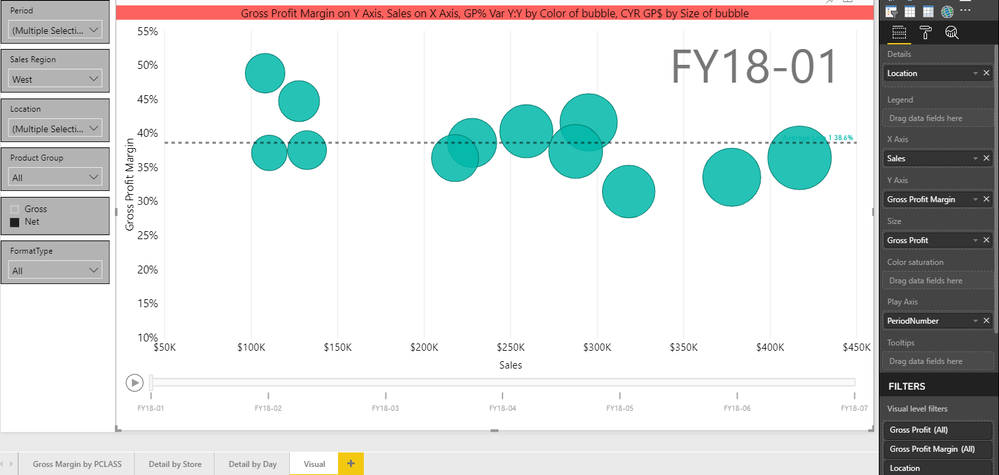
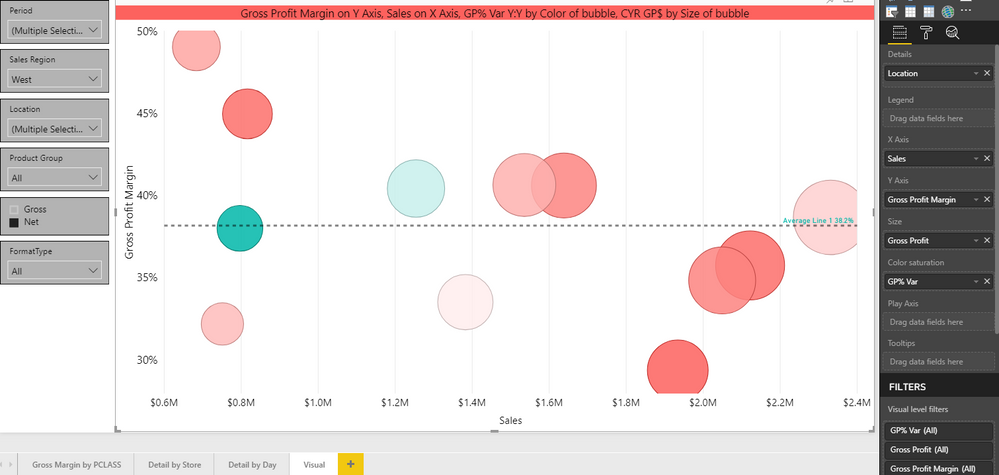
While editing a report online, the Scatter Plot visual does not allow me to place data of any kind into the Play Axis. When I replicate the visual in Power BI Desktop I do not have any issues. Any guidance on this issue?
Thanks,
Bradford
EDIT: The reason I originally could not replicate the error in desktop is because I was not using the color saturation field also.
Solved! Go to Solution.
After further research, it seems like this is still an issue waiting to be solved:
https://community.powerbi.com/t5/Desktop/Scatter-Chart-Color-stauration-disabled-when-using-Plat-Axi...
Hi bdurham15,
I have test on your issue but can't reproduce it. Do you still encounter with the issue if you create another scatter with another column? If probably, for further test, could you please share pbix with some dummy data with me?
Regards,
Jimmy Tao
v-yuta-msft
After further testing, if I take the color saturation field out, the play axis seems to work properly. It will not allow me to populate both the Play Axis and Color Saturation fields. See below
After further research, it seems like this is still an issue waiting to be solved:
https://community.powerbi.com/t5/Desktop/Scatter-Chart-Color-stauration-disabled-when-using-Plat-Axi...
v-yuta-msft
I tried creating another scatterplot with the same data, but that didn't help. There must be some limitation to the play axis that I am not aware of.
Here is the link to a pbix with dummy data that I still can't get to work.
Dummy pbix Scatter Plot Test
Thanks for your help,
Bradford
Check out the April 2026 Power BI update to learn about new features.
Sign up to receive a private message when registration opens and key events begin.
If you have recently started exploring Fabric, we'd love to hear how it's going. Your feedback can help with product improvements.
| User | Count |
|---|---|
| 10 | |
| 8 | |
| 8 | |
| 8 | |
| 7 |
| User | Count |
|---|---|
| 49 | |
| 27 | |
| 24 | |
| 20 | |
| 20 |