cancel
Showing results for 
Search instead for 
Did you mean: 

Data Days is here! Join us now for 60+ days of learning, challenges, and connection. Learn more

Reply
Anonymous
Not applicable

Salesforce Connection

Hello,


How do I connect my data from salesforce to Dataflows? When I go to add table, select salesforce objects (also report), I click sign in under connection credentials and a pop up windows opens saying "Site cannot be reached" and the URL for that pop up window is "https://mycustomurl.salesforce.com/...." . This happens when when the URL is the standard production. I just need a few tables from salesforce but am running into errors. 

1 ACCEPTED SOLUTION

You don't need to create one - use the existing one.

lbendlin_0-1629821400328.png


View solution in original post

5 REPLIES 5
AshokThangavelu
Regular Visitor

Hello, I cannot see my reports after connecting to Salesforce Reports. Any suggestions?

Possible reasons are that your organization has more reports than the Power BI preview is willing to load.  Pick any report from the list, and then replace its reportid with your own.

lbendlin
Super User
Super User

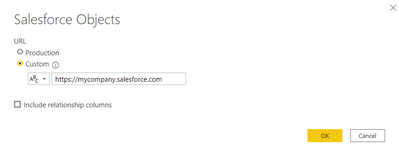
change your connection to use the custom URL instead of the standard one.

Anonymous
Not applicable

I dont believe I can create a custom URL on salesforce... 

You don't need to create one - use the existing one.

lbendlin_0-1629821400328.png


Helpful resources

Announcements
Fabric Data Days is here Carousel

Fabric Data Days 2026

Don't miss out on Data Days, June 15 through August 7. Learn Fabric, Power BI, SQL, AI and more.

May Power BI Update Carousel

Power BI Monthly Update - May 2026

Check out the May 2026 Power BI update to learn about new features.

Power BI DataViz World Championships carousel

Power BI DataViz World Championships - June 2026

A new Power BI DataViz World Championship is coming this June! Don't miss out on submitting your entry.