Join us in Barcelona for FabCon and SQLCon, September 28 - October 1, 2026.
This is best Fabric, Power BI, SQL and AI community event. How do we know? The last event sold out! Save €200 with code FABCMTY200.
Register now- Power BI forums
- Get Help with Power BI
- Desktop
- Service
- Report Server
- Power Query
- Mobile Apps
- Developer
- DAX Commands and Tips
- Custom Visuals Development Discussion
- Health and Life Sciences
- Power BI Spanish forums
- Translated Spanish Desktop
- Training and Consulting
- Instructor Led Training
- Dashboard in a Day for Women, by Women
- Galleries
- Data Stories Gallery
- Themes Gallery
- Contests Gallery
- QuickViz Gallery
- Quick Measures Gallery
- Visual Calculations Gallery
- Notebook Gallery
- Translytical Task Flow Gallery
- TMDL Gallery
- R Script Showcase
- Webinars and Video Gallery
- Ideas
- Custom Visuals Ideas (read-only)
- Issues
- Issues
- Events
- Upcoming Events
A new Data Days event is coming soon! This time we’re going bigger than ever. Fabric, Power BI, SQL, AI and more. Don't miss out.
- Power BI forums
- Forums
- Get Help with Power BI
- Service
- Running Total Issue
- Subscribe to RSS Feed
- Mark Topic as New
- Mark Topic as Read
- Float this Topic for Current User
- Bookmark
- Subscribe
- Printer Friendly Page


- Mark as New
- Bookmark
- Subscribe
- Mute
- Subscribe to RSS Feed
- Permalink
- Report Inappropriate Content
Running Total Issue
Hi ,
Need help in creating running total column
We are creating report using Connect Live option - SSAS Tabular
I have report in below format
Category Name Sales RTotal
ABC XXXX 100 100
XYZ AAAA 200 300
I need to get RTotal Column . i tried using Quick Measure - Running total but it didnt work stating MAx function can work only on numbers and not string (Category)
So need help for the same
Pls suggest
Solved! Go to Solution.


- Mark as New
- Bookmark
- Subscribe
- Mute
- Subscribe to RSS Feed
- Permalink
- Report Inappropriate Content
Hi, @GuestUser
Please provide more details .(Where did you write your measure)
Theoretically no matter in the directquery or live connect mode, Selectvalue function all can be recognized in PowerBI Desktop.
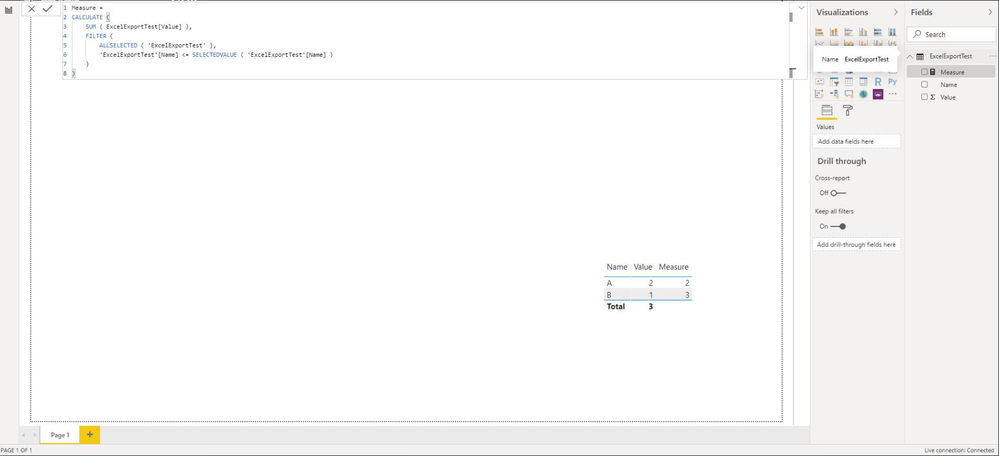
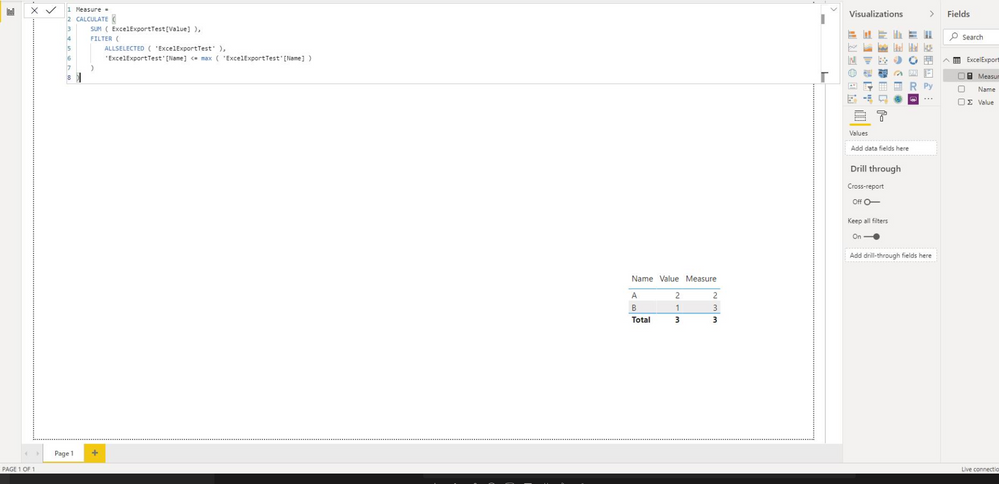
Best Regards,
Community Support Team _ Eason
- Mark as New
- Bookmark
- Subscribe
- Mute
- Subscribe to RSS Feed
- Permalink
- Report Inappropriate Content
Hi , @GuestUser
Could you please tell me whether your problem has been solved?
If it is, please mark the helpful replies or add your reply as Answered to close this thread?
Best Regards,
Community Support Team _ Eason
- Mark as New
- Bookmark
- Subscribe
- Mute
- Subscribe to RSS Feed
- Permalink
- Report Inappropriate Content
Hi , @GuestUser
If your want to change the type of sales from "text"to "decimal number",you need to do some change in SSAS model.
Please refer to this post to change your type of sales from "text" to " decimal number" in SSAS.
Best Regards,
Community Support Team _ Eason
If this post helps, then please consider Accept it as the solution to help the other members find it more quickly.
- Mark as New
- Bookmark
- Subscribe
- Mute
- Subscribe to RSS Feed
- Permalink
- Report Inappropriate Content
Hi,
I dont think isssue is with Sales Column.
Let me try to explain again :
When I select - New Quick Measure - RunningTotal . It assks for following things
Base value - Sales Amount
Field - Category ( It takes only columns and not measures)
Direction - Descending
and it will create measure with below formula
Measure =
Which is giving error - like MAX cannot work on String Data Types
Hope I am clear.
Any suggestions . Basically i need to achieve cumulative Total .
Any other formula /way to achieve the same ?
- Mark as New
- Bookmark
- Subscribe
- Mute
- Subscribe to RSS Feed
- Permalink
- Report Inappropriate Content
Hi , @GuestUser
Try measure as below:
Measure =
CALCULATE (
    [Sales],
    FILTER (
        ALLSELECTED ( 'Table'[Category] ),
        'Table'[Category] <= SELECTEDVALUE ( 'Table'[Category] )
    )
)
Best Regards,
Community Support Team _ Eason
If this post helps, then please consider Accept it as the solution to help the other members find it more quickly.
- Mark as New
- Bookmark
- Subscribe
- Mute
- Subscribe to RSS Feed
- Permalink
- Report Inappropriate Content
Thanks @v-easonf-msft
Selectvalue function is not recognized in the version of dax which i am using
Any other alternative pls?
- Mark as New
- Bookmark
- Subscribe
- Mute
- Subscribe to RSS Feed
- Permalink
- Report Inappropriate Content
Hi, @GuestUser
Please provide more details .(Where did you write your measure)
Theoretically no matter in the directquery or live connect mode, Selectvalue function all can be recognized in PowerBI Desktop.
Best Regards,
Community Support Team _ Eason


- Mark as New
- Bookmark
- Subscribe
- Mute
- Subscribe to RSS Feed
- Permalink
- Report Inappropriate Content
Sounds like you potentially need to switch Sales from being a Text field to a numeric field in your SSAS model.
Follow on LinkedIn
@ me in replies or I'll lose your thread!!!
Instead of a Kudo, please vote for this idea
Become an expert!: Enterprise DNA
External Tools: MSHGQM
YouTube Channel!: Microsoft Hates Greg
Latest book!: DAX For Humans
DAX is easy, CALCULATE makes DAX hard...
- Mark as New
- Bookmark
- Subscribe
- Mute
- Subscribe to RSS Feed
- Permalink
- Report Inappropriate Content
Sales is a measure column which is sum of sales_amount which is numeric only

Helpful resources

Power BI Monthly Update - May 2026
Check out the May 2026 Power BI update to learn about new features.

Data Days 2026 coming soon!
Sign up to receive a private message when registration opens and key events begin.

New to Fabric Survey
If you have recently started exploring Fabric, we'd love to hear how it's going. Your feedback can help with product improvements.

Power BI DataViz World Championships - June 2026
A new Power BI DataViz World Championship is coming this June! Don't miss out on submitting your entry.

| User | Count |
|---|---|
| 14 | |
| 10 | |
| 9 | |
| 7 | |
| 6 |


| User | Count |
|---|---|
| 34 | |
| 28 | |
| 26 | |
| 21 | |
| 16 |


