cancel
Showing results for 
Search instead for 
Did you mean: 

The Power BI Data Visualization World Championships is back! Get ahead of the game and start preparing now! Learn more

Reply
bongmw
Helper I
Helper I

Retrieving Incremental Refresh Configuration on Power BI Service

Hi all,


Incremental Refresh is configured with Power BI Desktop (e.g. Store rows in the last x Years/Months, Refresh rows in the last x, Detect data changes etc.) before being published to Power BI Service.


Is there any way to retrieve these configuration values for a table after publishing to Power BI Service? Either with APIs, XMLA Endpoints or any other means?


I am aware of scripting a table with TMSL to retrieve the criteria that the table partitions are based on, but is there any way to retrieve the full configuration?


Thanks in advance!


1 ACCEPTED SOLUTION
lbendlin
Super User
Super User

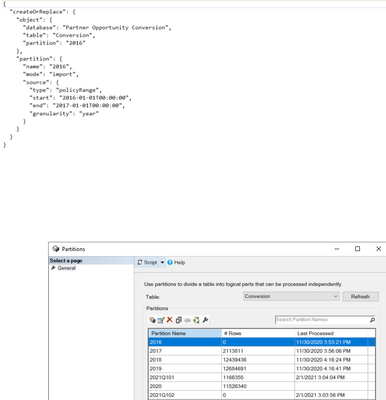
you mean like this?

lbendlin_0-1612303343327.png


View solution in original post

3 REPLIES 3
lbendlin
Super User
Super User

It is worth mentioning that the implemented partitions may be quite different from what the developer is requesting, especially if the developer lives on a fiscal calendar.  Partitions are always bounded by regular calendar intervals at UTC.  Does't really matter much for the outcome, but worth knowing.

bongmw
Helper I
Helper I

Thanks @lbendlin ! I was looking under the "Partitions" bit of the definition and missed this completely!

lbendlin
Super User
Super User

you mean like this?

lbendlin_0-1612303343327.png


Helpful resources

Announcements
Power BI DataViz World Championships

Power BI Dataviz World Championships

The Power BI Data Visualization World Championships is back! Get ahead of the game and start preparing now!

December 2025 Power BI Update Carousel

Power BI Monthly Update - December 2025

Check out the December 2025 Power BI Holiday Recap!

FabCon Atlanta 2026 carousel

FabCon Atlanta 2026

Join us at FabCon Atlanta, March 16-20, for the ultimate Fabric, Power BI, AI and SQL community-led event. Save $200 with code FABCOMM.