Join us at FabCon Atlanta from March 16 - 20, 2026, for the ultimate Fabric, Power BI, AI and SQL community-led event. Save $200 with code FABCOMM.
Register now!The Power BI Data Visualization World Championships is back! Get ahead of the game and start preparing now! Learn more
Hi Team ,
I have a power bi report that is published to MY WORKSPACE and it has RLS Assigned.
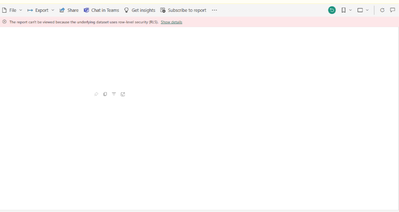
when i share the link of Report to someone who is not assigned to a role in RLS instead of a dialog box for requesting access there is this happening :
She/He can't view the dashboard because it is saying that
: "The Report Cant be viewed due to underlying dataset uses RLS Security"
What should i do ?
thanks and regards
Hi @Anonymous ,
There are official documentation limitations here:
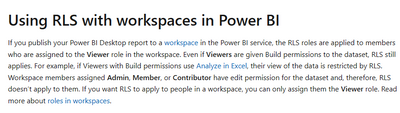
For RLS to work, the users must be in the 'Viewer' role at the workspace level. If they are Admin, Member or Contributor, they will be able to see all the data.
There are more restrictions, you can refer to the following documents:
Row-level security (RLS) with Power BI - Power BI | Microsoft Learn
This is the related document, you can view this content:
Solved: The report can't be viewed because the underlying ... - Microsoft Fabric Community
Solved: Re: The report can't be viewed because the underly... - Microsoft Fabric Community
Best Regards,
Liu Yang
If this post helps, then please consider Accept it as the solution to help the other members find it more quickly.
The Power BI Data Visualization World Championships is back! Get ahead of the game and start preparing now!
| User | Count |
|---|---|
| 56 | |
| 56 | |
| 35 | |
| 18 | |
| 14 |