FabCon is coming to Atlanta
Join us at FabCon Atlanta from March 16 - 20, 2026, for the ultimate Fabric, Power BI, AI and SQL community-led event. Save $200 with code FABCOMM.
Register now!- Power BI forums
- Get Help with Power BI
- Desktop
- Service
- Report Server
- Power Query
- Mobile Apps
- Developer
- DAX Commands and Tips
- Custom Visuals Development Discussion
- Health and Life Sciences
- Power BI Spanish forums
- Translated Spanish Desktop
- Training and Consulting
- Instructor Led Training
- Dashboard in a Day for Women, by Women
- Galleries
- Data Stories Gallery
- Themes Gallery
- Contests Gallery
- QuickViz Gallery
- Quick Measures Gallery
- Visual Calculations Gallery
- Notebook Gallery
- Translytical Task Flow Gallery
- TMDL Gallery
- R Script Showcase
- Webinars and Video Gallery
- Ideas
- Custom Visuals Ideas (read-only)
- Issues
- Issues
- Events
- Upcoming Events
The Power BI Data Visualization World Championships is back! Get ahead of the game and start preparing now! Learn more
- Power BI forums
- Forums
- Get Help with Power BI
- Service
- Re: Reports not updating after scheduled refresh
- Subscribe to RSS Feed
- Mark Topic as New
- Mark Topic as Read
- Float this Topic for Current User
- Bookmark
- Subscribe
- Printer Friendly Page


- Mark as New
- Bookmark
- Subscribe
- Mute
- Subscribe to RSS Feed
- Permalink
- Report Inappropriate Content
Reports not updating after scheduled refresh
Hi All,
I am having an issue with my reports on the PowerBI service. I have published a report and have set up my gateway and scheduled a refresh of the data from my SQL server. The problem is, that after the scheduled refresh (and even manual refresh), which doesn't fail, my report is not updating. I have read some posts saying that there is a delay for report refresh, but mine have never updated.
Is there something I have done incorrectly from the start I wonder? Does anyone have any suggestions as to what this may be?

- Mark as New
- Bookmark
- Subscribe
- Mute
- Subscribe to RSS Feed
- Permalink
- Report Inappropriate Content
Hi there! I am wondering if you figured out the problem?
Can you please share your answer if you did?
- Mark as New
- Bookmark
- Subscribe
- Mute
- Subscribe to RSS Feed
- Permalink
- Report Inappropriate Content
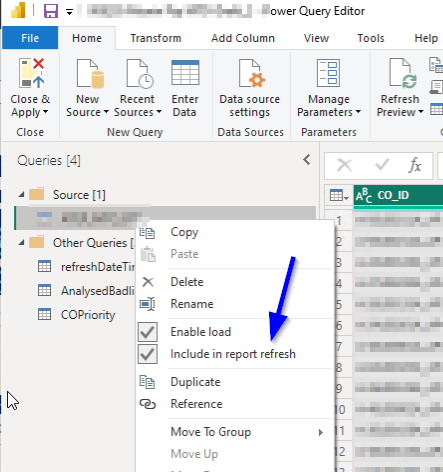
i think i found my problem. its due to the setting in my query
- Mark as New
- Bookmark
- Subscribe
- Mute
- Subscribe to RSS Feed
- Permalink
- Report Inappropriate Content
Hello @Nurry90 ,
I have been having the same issue for months, have you found a solution by any chance?
I'd be so grateful if you could share it because I am having a hard time regarding to getting help on this subject.

- Mark as New
- Bookmark
- Subscribe
- Mute
- Subscribe to RSS Feed
- Permalink
- Report Inappropriate Content
- Mark as New
- Bookmark
- Subscribe
- Mute
- Subscribe to RSS Feed
- Permalink
- Report Inappropriate Content
Hi @Nurry90
Could you tell me if your problem has been solved? If it is, kindly Accept it as the solution. More people will benefit from it. Or you are still confused about it, please provide me with more details about your problem.
Best Regards,
Rico Zhou
- Mark as New
- Bookmark
- Subscribe
- Mute
- Subscribe to RSS Feed
- Permalink
- Report Inappropriate Content
Hi @Nurry90
Could you tell me what kind of connection mode you use to get data from SQL Server(Direct Query or Import)?
Firstly please check whether your gateway works normally. Can you succeed to refresh other reports?
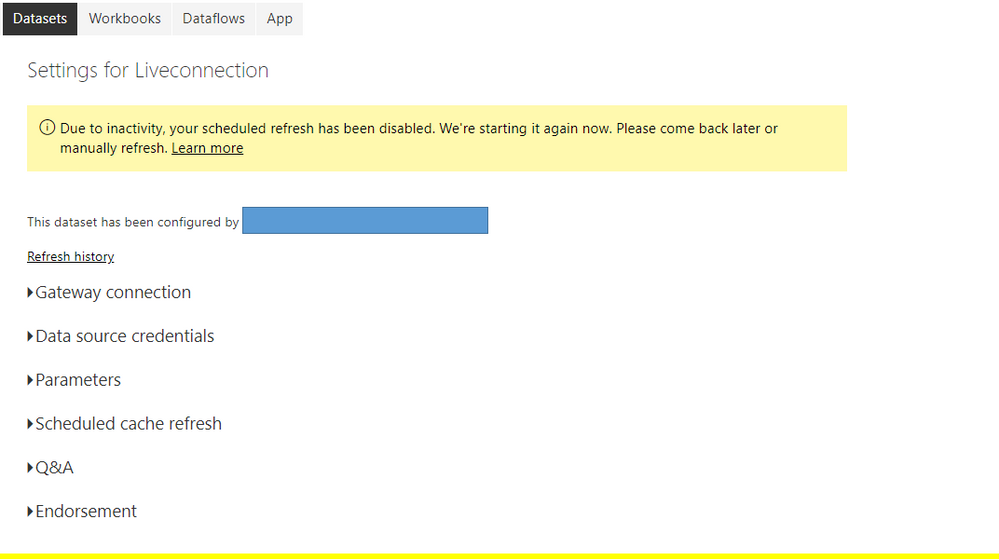
If it works well, please check your refresh history in Setting - Datasets. If it shows failure, please show me your screenshot of its details.
And check your Date Source credentials. If it shows error, please edit your credential again.
Here are some blogs about refresh, I hope they could help you.
Blog: Troubleshooting refresh scenarios
Blog: Configure scheduled refresh
Blog: Data refresh in Power BI
Best Regards,
Rico Zhou
If this post helps, then please consider Accept it as the solution to help the other members find it more quickly.


- Mark as New
- Bookmark
- Subscribe
- Mute
- Subscribe to RSS Feed
- Permalink
- Report Inappropriate Content
Are you you seeing updates when you refresh locally? Wondering if its a refresh issue, or a data model issue.
Also to confirm that its not a cache issue, i suggest clicking on the refresh icon on the report page, which refreshes just the the visual layer.
PS: Please mark this post as a "solution" if this helps solving the issue and/or hit the "thumbs-up" button if you found this insighful. Thanks.
- Mark as New
- Bookmark
- Subscribe
- Mute
- Subscribe to RSS Feed
- Permalink
- Report Inappropriate Content
Hi @mahimabedi,
I have refreshed on the report visual, and still no current tata coming through.
Also, report is showing as refreshed in the workspace too. See below. What data model issues could it be?

- Mark as New
- Bookmark
- Subscribe
- Mute
- Subscribe to RSS Feed
- Permalink
- Report Inappropriate Content
Maybe there is a step in data transformation thats filtering out the data. If you are seeing the expected behaviour in desktop and not in service, that points to a issue in the service. IF however it doesnot work in desktop either, it might make sence to debug within the dekstop file.
PS: Please mark this post as a "solution" if this helps solving the issue and/or hit the "thumbs-up" button if you found this insighful. Thanks.
- Mark as New
- Bookmark
- Subscribe
- Mute
- Subscribe to RSS Feed
- Permalink
- Report Inappropriate Content
Hi @mahimabedi ,
My refreshes are working fine on Desktop, it's only when on the service that they are not updating with the scheduled refresh. I don't know how to fix this?!
Helpful resources

Power BI Dataviz World Championships
The Power BI Data Visualization World Championships is back! Get ahead of the game and start preparing now!

Power BI Monthly Update - December 2025
Check out the December 2025 Power BI Holiday Recap!

FabCon Atlanta 2026
Join us at FabCon Atlanta, March 16-20, for the ultimate Fabric, Power BI, AI and SQL community-led event. Save $200 with code FABCOMM.


| User | Count |
|---|---|
| 64 | |
| 55 | |
| 27 | |
| 18 | |
| 18 |


