FabCon is coming to Atlanta
Join us at FabCon Atlanta from March 16 - 20, 2026, for the ultimate Fabric, Power BI, AI and SQL community-led event. Save $200 with code FABCOMM.
Register now!- Power BI forums
- Get Help with Power BI
- Desktop
- Service
- Report Server
- Power Query
- Mobile Apps
- Developer
- DAX Commands and Tips
- Custom Visuals Development Discussion
- Health and Life Sciences
- Power BI Spanish forums
- Translated Spanish Desktop
- Training and Consulting
- Instructor Led Training
- Dashboard in a Day for Women, by Women
- Galleries
- Data Stories Gallery
- Themes Gallery
- Contests Gallery
- QuickViz Gallery
- Quick Measures Gallery
- Visual Calculations Gallery
- Notebook Gallery
- Translytical Task Flow Gallery
- TMDL Gallery
- R Script Showcase
- Webinars and Video Gallery
- Ideas
- Custom Visuals Ideas (read-only)
- Issues
- Issues
- Events
- Upcoming Events
Vote for your favorite vizzies from the Power BI Dataviz World Championship submissions. Vote now!
- Power BI forums
- Forums
- Get Help with Power BI
- Service
- Report does not update
- Subscribe to RSS Feed
- Mark Topic as New
- Mark Topic as Read
- Float this Topic for Current User
- Bookmark
- Subscribe
- Printer Friendly Page

- Mark as New
- Bookmark
- Subscribe
- Mute
- Subscribe to RSS Feed
- Permalink
- Report Inappropriate Content
Report does not update
Hi all,
Its my first time here and I have no experience with Power BI, so first of all my apologies for any stupid question.
I have some reports on Power BI that use an ERP Database through Onpremises Gateway. The gateway connection with my database(SQL Server) is succesfully on gateway management.
But my reports is not updating and I can't see any error message or it means nothing for me. When trying to update, a message like this appears:
Cluster URI: WABI-BRAZIL-SOUTH-B-PRIMARY-redirect.analysis.windows.net
ID da atividade: 6b1axxxx-3729-9273-xxxx-6dd13xxxxxxx
Solicitar ID: 9425xxxx-6283-xxxx-9173-3eb0dxxxxxxx
Hora: 2022-03-31 15:29:27Z
I really have no idea how to solve this issue, once the report was updating about 15 days ago and nothing changed since that.
Is there any location to find other error messages ou anything that I could do to solve this?
Thanks in advance
Solved! Go to Solution.
- Mark as New
- Bookmark
- Subscribe
- Mute
- Subscribe to RSS Feed
- Permalink
- Report Inappropriate Content
I found the solution or maybe a workaround.
I run netsh commands to reset all conn settings on my onpremises gateway server and this solved my issue.
Now, I have no idea why the conn between my GWServer was not working with my SQL Server. I am gonna check the winlogs.
Thanks for all!

- Mark as New
- Bookmark
- Subscribe
- Mute
- Subscribe to RSS Feed
- Permalink
- Report Inappropriate Content
Hi , @atoniati
I am so glad to hear that your problem have been solved , please consider Accept it as the solution to help the other members find it more quickly.
Best Regards,
Community Support Team _ Ailsa Tao
If this post helps, then please consider Accept it as the solution to help the other members find it more quickly.


- Mark as New
- Bookmark
- Subscribe
- Mute
- Subscribe to RSS Feed
- Permalink
- Report Inappropriate Content
- Mark as New
- Bookmark
- Subscribe
- Mute
- Subscribe to RSS Feed
- Permalink
- Report Inappropriate Content
Yes, in Power BI Desktop everythins works fine.

- Mark as New
- Bookmark
- Subscribe
- Mute
- Subscribe to RSS Feed
- Permalink
- Report Inappropriate Content
Hi Atoniati,
Can you go to your dataset settings and click Refresh History
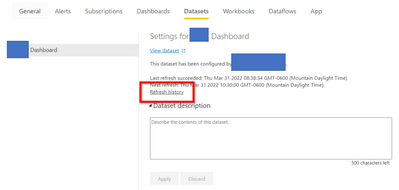
Sometimes you will see error message why the refresh fails in there.
- Mark as New
- Bookmark
- Subscribe
- Mute
- Subscribe to RSS Feed
- Permalink
- Report Inappropriate Content
I found the solution or maybe a workaround.
I run netsh commands to reset all conn settings on my onpremises gateway server and this solved my issue.
Now, I have no idea why the conn between my GWServer was not working with my SQL Server. I am gonna check the winlogs.
Thanks for all!
- Mark as New
- Bookmark
- Subscribe
- Mute
- Subscribe to RSS Feed
- Permalink
- Report Inappropriate Content
I had the same issue before, gonna keep your solution in mind! Thanks
- Mark as New
- Bookmark
- Subscribe
- Mute
- Subscribe to RSS Feed
- Permalink
- Report Inappropriate Content
Hi,
See the error message below:
{"error":{"code":"DM_GWPipeline_Gateway_TimeoutError","pbi.error":{"code":"DM_GWPipeline_Gateway_TimeoutError","parameters":{},"details":[],"exceptionCulprit":1}}}
Helpful resources

Power BI Dataviz World Championships
Vote for your favorite vizzies from the Power BI World Championship submissions!

Join our Community Sticker Challenge 2026
If you love stickers, then you will definitely want to check out our Community Sticker Challenge!

Power BI Monthly Update - January 2026
Check out the January 2026 Power BI update to learn about new features.

FabCon Atlanta 2026
Join us at FabCon Atlanta, March 16-20, for the ultimate Fabric, Power BI, AI and SQL community-led event. Save $200 with code FABCOMM.

| User | Count |
|---|---|
| 18 | |
| 10 | |
| 9 | |
| 8 | |
| 7 |


| User | Count |
|---|---|
| 46 | |
| 39 | |
| 38 | |
| 25 | |
| 24 |


