cancel
Showing results for 
Search instead for 
Did you mean: 

We've captured the moments from FabCon & SQLCon that everyone is talking about, and we are bringing them to the community, live and on-demand. Starts on April 14th. Register now

Reply
atoniati
New Member

Report does not update

Hi all,


Its my first time here and I have no experience with Power BI, so first of all my apologies for any stupid question.


I have some reports on Power BI that use an ERP Database through Onpremises Gateway. The gateway connection with my database(SQL Server) is succesfully on gateway management.

But my reports is not updating and I can't see any error message or it means nothing for me. When trying to update, a message like this appears:


Cluster URI: WABI-BRAZIL-SOUTH-B-PRIMARY-redirect.analysis.windows.net
ID da atividade: 6b1axxxx-3729-9273-xxxx-6dd13xxxxxxx
Solicitar ID: 9425xxxx-6283-xxxx-9173-3eb0dxxxxxxx
Hora: 2022-03-31 15:29:27Z


I really have no idea how to solve this issue, once the report was updating about 15 days ago and nothing changed since that.


Is there any location to find other error messages ou anything that I could do to solve this?


Thanks in advance

1 ACCEPTED SOLUTION

I found the solution or maybe a workaround.

I run netsh commands to reset all conn settings on my onpremises gateway server and this solved my issue.


Now, I have no idea why the conn between my GWServer was not working with my SQL Server. I am gonna check the winlogs.


Thanks for all!

View solution in original post

7 REPLIES 7
Anonymous
Not applicable

Hi , @atoniati 

I am so glad to hear that your problem have been solved , please consider Accept it as the solution to help the other members find it more quickly.


Best Regards,
Community Support Team _ Ailsa Tao
If this post helps, then please consider Accept it as the solution to help the other members find it more quickly.

GilbertQ
Super User
Super User

Hi @atoniati 


What happens when you refresh using PBI Desktop does it refresh?


Did I answer your question? Mark my post as a solution!

Proud to be a Super User!


Power BI Blog

Yes, in Power BI Desktop everythins works fine.

Tutu_in_YYC
Super User
Super User

Hi Atoniati,
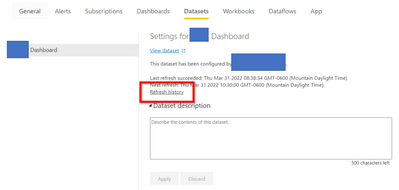
Can you go to your dataset settings and click Refresh History

Tutu_in_YYC_0-1648744212712.png


Sometimes you will see error message why the refresh fails in there.

I found the solution or maybe a workaround.

I run netsh commands to reset all conn settings on my onpremises gateway server and this solved my issue.


Now, I have no idea why the conn between my GWServer was not working with my SQL Server. I am gonna check the winlogs.


Thanks for all!

I had the same issue before, gonna keep your solution in mind! Thanks

Hi,


See the error message below:


{"error":{"code":"DM_GWPipeline_Gateway_TimeoutError","pbi.error":{"code":"DM_GWPipeline_Gateway_TimeoutError","parameters":{},"details":[],"exceptionCulprit":1}}}

Helpful resources

Announcements
New to Fabric survey Carousel

New to Fabric Survey

If you have recently started exploring Fabric, we'd love to hear how it's going. Your feedback can help with product improvements.

Power BI DataViz World Championships carousel

Power BI DataViz World Championships - June 2026

A new Power BI DataViz World Championship is coming this June! Don't miss out on submitting your entry.

Join our Fabric User Panel

Join our Fabric User Panel

Share feedback directly with Fabric product managers, participate in targeted research studies and influence the Fabric roadmap.

March Power BI Update Carousel

Power BI Community Update - March 2026

Check out the March 2026 Power BI update to learn about new features.

Top Solution Authors