Join us at FabCon Atlanta from March 16 - 20, 2026, for the ultimate Fabric, Power BI, AI and SQL community-led event. Save $200 with code FABCOMM.
Register now!Vote for your favorite vizzies from the Power BI Dataviz World Championship submissions. Vote now!
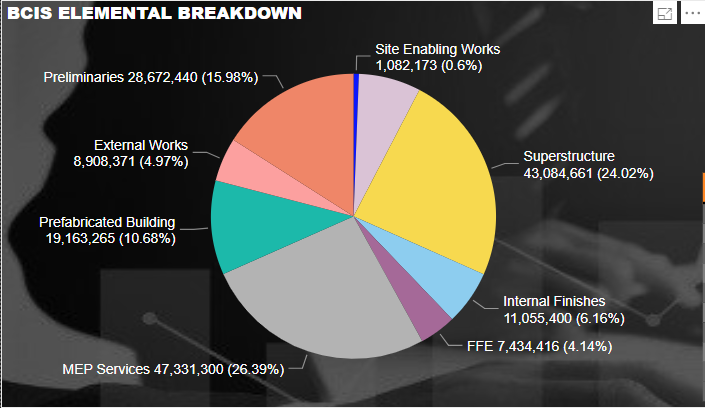
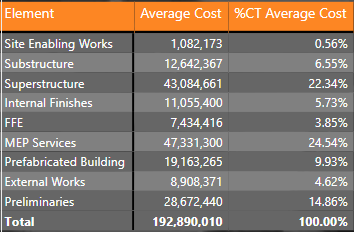
May I ask if someone can enlighten me about an issue in my report. I made a DAX formula to average items that only shows figures. The pie chart I made shows correct values and equivalent percentage. However, when I made a table out of those figures, the percentage show differently. It seems the percentage came from the sum of the average of multiple items which I cannot traced anymore. I'd like to reiterate that the source of these 2 visualizations came from the same source which is the DAX formula I made.
Solved! Go to Solution.
hi, @Anonymous
"%CT" is just the current row value / the measure total of current level.
For example:
In your matrix, %CT Average Cost =Average Cost / measure total (192890010)
But in the pie percent is the value / the total value of current level (SUM all the value of measure).
and the difference between measure total and total value, please see this post about it
https://community.powerbi.com/t5/DAX-Commands-and-Tips/Dealing-with-Measure-Totals/td-p/63376
Also, this Quick Measure, Measure Totals, The Final Word should get you what you need:
https://community.powerbi.com/t5/Quick-Measures-Gallery/Measure-Totals-The-Final-Word/m-p/547907
Best Regards,
Lin
hi, @Anonymous
"%CT" is just the current row value / the measure total of current level.
For example:
In your matrix, %CT Average Cost =Average Cost / measure total (192890010)
But in the pie percent is the value / the total value of current level (SUM all the value of measure).
and the difference between measure total and total value, please see this post about it
https://community.powerbi.com/t5/DAX-Commands-and-Tips/Dealing-with-Measure-Totals/td-p/63376
Also, this Quick Measure, Measure Totals, The Final Word should get you what you need:
https://community.powerbi.com/t5/Quick-Measures-Gallery/Measure-Totals-The-Final-Word/m-p/547907
Best Regards,
Lin
If you love stickers, then you will definitely want to check out our Community Sticker Challenge!
Check out the January 2026 Power BI update to learn about new features.
| User | Count |
|---|---|
| 23 | |
| 13 | |
| 10 | |
| 10 | |
| 9 |
| User | Count |
|---|---|
| 58 | |
| 41 | |
| 31 | |
| 26 | |
| 25 |