cancel
Showing results for 
Search instead for 
Did you mean: 

Try your skills in the Power BI Dataviz World Championship! Round one ends June 26. Join now

Reply
Anonymous
Not applicable

Report Visualization Issue

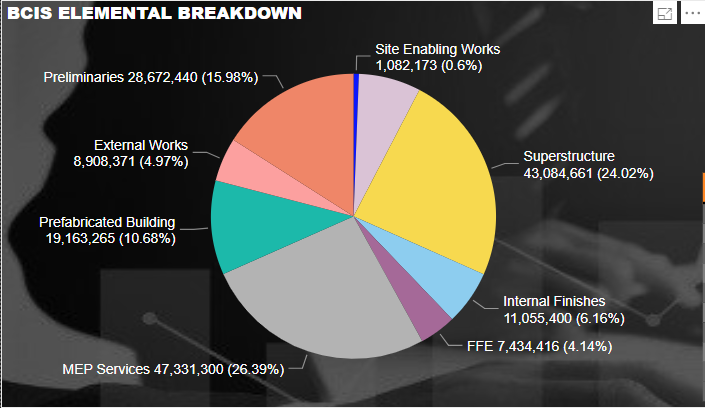
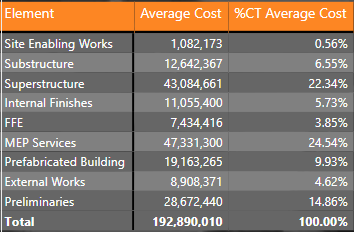
May I ask if someone can enlighten me about an issue in my report. I made a DAX formula to average items that only shows figures. The pie chart I made shows correct values and equivalent percentage. However, when I made a table out of those figures, the percentage show differently. It seems the percentage came from the sum of the average of multiple items which I cannot traced anymore. I'd like to reiterate that the source of these 2 visualizations came from the same source which is the DAX formula I made.


image.pngimage.png

1 ACCEPTED SOLUTION
v-lili6-msft
Community Support
Community Support

hi, @Anonymous 

"%CT" is just the current row value / the measure total of current level.

For example:

In your matrix, %CT Average Cost =Average Cost / measure total (192890010)

9.JPG

But in the pie percent is the value / the total value of current level (SUM all the value of measure).


and the difference between measure total and total value, please see this post about it


https://community.powerbi.com/t5/DAX-Commands-and-Tips/Dealing-with-Measure-Totals/td-p/63376

Also, this Quick Measure, Measure Totals, The Final Word should get you what you need:
https://community.powerbi.com/t5/Quick-Measures-Gallery/Measure-Totals-The-Final-Word/m-p/547907


Best Regards,

Lin

Community Support Team _ Lin
If this post helps, then please consider Accept it as the solution to help the other members find it more quickly.

View solution in original post

1 REPLY 1
v-lili6-msft
Community Support
Community Support

hi, @Anonymous 

"%CT" is just the current row value / the measure total of current level.

For example:

In your matrix, %CT Average Cost =Average Cost / measure total (192890010)

9.JPG

But in the pie percent is the value / the total value of current level (SUM all the value of measure).


and the difference between measure total and total value, please see this post about it


https://community.powerbi.com/t5/DAX-Commands-and-Tips/Dealing-with-Measure-Totals/td-p/63376

Also, this Quick Measure, Measure Totals, The Final Word should get you what you need:
https://community.powerbi.com/t5/Quick-Measures-Gallery/Measure-Totals-The-Final-Word/m-p/547907


Best Regards,

Lin

Community Support Team _ Lin
If this post helps, then please consider Accept it as the solution to help the other members find it more quickly.
Helpful resources

Announcements
Fabric Data Days is here Carousel

Fabric Data Days 2026

Don't miss out on Data Days, June 15 through August 7. Learn Fabric, Power BI, SQL, AI and more.

Power BI DataViz World Championships carousel

Power BI DataViz World Championships - June 2026

A new Power BI DataViz World Championship is coming this June! Don't miss out on submitting your entry.