cancel
Showing results for 
Search instead for 
Did you mean: 

Vote for your favorite vizzies from the Power BI Dataviz World Championship submissions. Vote now!

Reply
s168635
Helper II
Helper II

Report Usage Metric Report

Hi,


I have a report shared with external users not in my organization and I rely on the "Report Usage Metric Report" to see if someone has access the report or not.


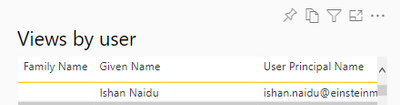
A few users said that they did access the report via the invitation link but somehow I did not see their entries while I export data of "Views By user".


s168635_0-1654694715280.png


Is there any reason some visits are in it while others are not?


Thanks,


Bo


2 REPLIES 2
v-zhangti
Community Support
Community Support

Hi, @s168635 


There are several possibilities.

1. It could take 24 hours to update the reports. Please test after 24 hours to see if the data is updated. 


2. "A viewer is someone who opened the report at least once during the time period (based on the AAD user account)." Please confirm if these users are using AAD accounts to access reports?


Please refer to the following link, hope it can help you.

https://docs.microsoft.com/en-us/power-bi/collaborate-share/service-modern-usage-metrics 

https://docs.microsoft.com/en-us/azure/active-directory/fundamentals/active-directory-whatis 

https://docs.microsoft.com/en-us/power-bi/developer/embedded/create-an-azure-active-directory-tenant 


Best Regards,

Community Support Team _Charlotte

If this post helps, then please consider Accept it as the solution to help the other members find it more quickly.

It is not 24 hours - one of the users sent me her screen shot of the report two weeks ago and I still did not see her in the usage report.

The user is not AAD account but self registered O365 account, some of her fellow users do show up in usage report under same situation.


Another AAD user reported the same thing - these are external users and I rely on the accuracy of the usage metric to know if they actually opened the report or not via the shared link sent to them.


At least for now, I did not see any pattern how it could happen.

Helpful resources

Announcements
Power BI DataViz World Championships

Power BI Dataviz World Championships

Vote for your favorite vizzies from the Power BI World Championship submissions!

Sticker Challenge 2026 Carousel

Join our Community Sticker Challenge 2026

If you love stickers, then you will definitely want to check out our Community Sticker Challenge!

January Power BI Update Carousel

Power BI Monthly Update - January 2026

Check out the January 2026 Power BI update to learn about new features.

FabCon Atlanta 2026 carousel

FabCon Atlanta 2026

Join us at FabCon Atlanta, March 16-20, for the ultimate Fabric, Power BI, AI and SQL community-led event. Save $200 with code FABCOMM.